Showing posts with label coop. Show all posts

Tuesday, January 23, 2007

Google Coop Custom Search Engine Statistics

Last October Google Coops Custom Search Engine started producing a Most Popular List of custom search engines in a variety of categories to provide some metrics on which CSEs were popular.


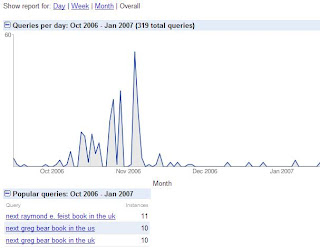
I've now noticed that those of us with our own Custom Search Engines have access to usage trends and popular queries metrics as well. Clicking the 'statistics' link on your CSE page displays a graph showing queries per day, and a summary of the most popular queries made using your CSE.

This is really useful as it gives us some proper metrics on how often our CSEs are used, and what they're used for. I'd like to see metrics like this for the other Coop property, subscribed links, as well.
Update: It's now been announced on the Google Custom Search blog.

Monday, November 27, 2006

Book Releases with Nexus.Alerts: Developing on the GoogleOS

Part 1: For Those Who Love Books...

I love new books. I count down the days until favorite authors release the next shining tome of their current series -- just to make sure I can be at the bookstore bright and early to pick up a crisp, mint, first edition.

If that sounds familiar then check out my online book release tracking tools at Nexus.Alerts, featuring:
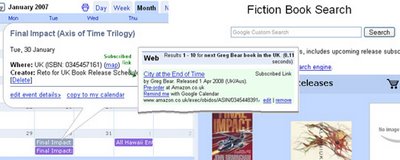
I've been using these tools for a while to track upcoming book releases and thought I'd put them together and share them. They're at Nexus.Alerts, along with the full list of almost 20 authors I'm currently tracking, plus a an Amazon storefront for your pre-ordering needs.

Part2: ...For Those Interested in the Technology

There has been a lot of talk lately about a GoogleOS. Theories include Linux distros and web desktops, either way people want a Windows killer. I think this is off track. Google aren't interested in replacing the desktop, there's no need -- why tackle MS head-on? Instead they'll subvert it, by turning desktop apps into attractive thin clients, with the heavy lifting done by online services.

Picasa and Sketchup show Google know that some things are best done on the desktop, but they also show you can leverage further benefits by linking the desktop to the web. As a desktop developer I thought I'd test this theory for myself. Below are my experiences developing Nexus.Alerts for the GoogleOS.

Creating Nexus.Alerts

Context is central to our expectations when finding information.

Take book releases; I'd expect to use a calendar to check which releases are coming up, but a Google search would be my first destination to check release dates for a specific author. If I want regular updates about new releases I'd be looking for an RSS feed. It's the same set of information but the reason I want it is a significant factor in how I expect to find it.

I wrote Nexus.Alerts so I could keep a close eye on book release dates. I started by writing code that regularly collects and structures upcoming book release data, the next goal was then to make it as accessible as possible.

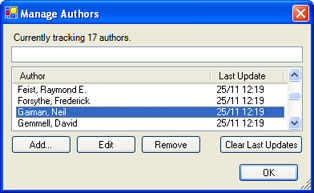
I started with a desktop client that collects release data, displays upcoming releases, and lets me manage the authors I want to track.

It's based on a larger project (The Nexus) that I've been neglecting for months. Not coincidently, I'm at home with my laptop a lot less often than I'd like, which is why accessibility is so important.

I'm no web guru; realtime Windows application development is my thing, so I wasn't inclined to create a web app for the job. But with Google quietly developing a WebOS platform I can build a nice AJAXy site with calendars, RSS feeds, author searches, and a customized store front with Google (and a little help from Amazon) doing the heavy lifting.

The result is that my desktop client is now a light-weight server, effectively transferring my data dynamically to various Google services. In executive speak that's 'leveraging SOA' or as I like to think of it 'using other people's brains and bandwidth'. See below for how it was done.

Developing on the GoogleOS

If a Google powered WebOS becomes a reality, Google's APIs are going to be a cornerstone of their empire. They're coming along rapidly, and companies like Amazon are also producing some fine web APIs. Full details on Google's APIs and developer tools can be found on their Google code site.

The good news is decent programmers of many stripes can develop on the Google platform. The most powerful API - and their standard - is gData. gData includes Java, C++, Python, and C# client libraries; I'm a C# programmer so that's what I used.

I constructed Nexus.Alerts with these Google services:

Also at play are the following Amazon services*.

*I'm not going to focus on Amazon's offerings in this post as I'm saving them for a later one, but let me say upfront that their services are outstanding. Note to Google -- buy Amazon. No, seriously. Buy them.

Calendar

The Google Calendar API rocks. Calendar was one of the first Google services to fully leverage gData, and Google have been active in making sure it's up to snuff. There's plenty of feedback in the developer community and you can add or track issues on the gData open source project issues page.

Here's what I'm doing with Calendar:

  1. Whenever my desktop client/server finds a new book, it adds a new calendar entry.
  2. If any release details have changed it updates the calendar entry.
  3. If I choose to ignore a particular book, or the book has come out (therefore it's no longer the next release), it removes the calendar entry.

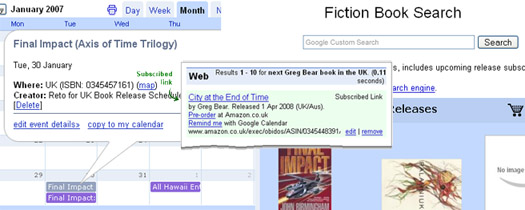
The result is upcoming book releases in the context of my Google calendar.

Here's a few tricky points to note for gCal development:

  • There's no explicit way to 'remember' or identify a particular calendar entry. So every session the desktop app wants to update the calendar, it goes through the book list and reconciles it with the calendar entries. For this to work you need to embed an index, or identifier, into the calendar entries so you can uniquely identify them. I'm dealing with books so the ISBN is perfect. I've put it in the location field because the location field isn't relevant and so is unlikely to be messed with.
  • Getting the correct url path for a calendar to use in the API is non-trivial. None of the 'address' buttons generate exactly the right string. To get the correct path you want a string in the form of: http://www.google.com/calendar/feeds/cagd3an5b8go7bkfbqfvvimhls@group.calendar.google.com/private/full You can get most of those details by clicking the XML button calendar address button on the calendar settings page. Make sure you have /private/full at the end.
  • Asking for all events on a calendar defaults to one 'page' (25 by default). Either remember this and page through, or set your ItemsPerPage for your gDataFeed to int.MaxValue. I've had problems with paging (it didn't), so I'd recommend the latter.
  • No analytics. Google doesn't provide any feedback telling you how many people are using your calendar. Hopefully Google will implement something like the feedback for Google base items that tells you how many people have viewed / clicked through to your item.

...And some bonus tips to take home from the experience:

  • Once you're setup it's really easy. You can keep references to your entry objects, and you can call .Update() or .Delete() directly on the EventEntry objects. So once you've gone through and found the references once, further run-time changes to calendar events are quick and easy.
  • You can include HTML links in the calendar description field! I've included links to Amazon to pre-order books, in future I'll probably add a link to the author's website as well.
  • It's fast. Adding / removing / modifying entries is lightning quick, and the effects are seen instantly on the Calendar WebApp (You may need to hit refresh).
  • As mentioned above, the client libraries are open source and available from Google's Source Code Repository. Get updates as they're implemented and become part of the community.

Subscribed Links (Coop)

I'm a massive fan of Coop, I believe it's Google's most underutilized and underrated service. I mean seriously, a customizable onebox!? Why won't people put useful information in there? It's simple to setup, trivial to update, and can be very effective.

Follow this link to see a Nexus.Alerts book release one-box result.

I'm using SLs to:

  1. Answer question like: "What's the next book by Raymond E. Feist in the UK?" (For any author in the UK/US).
  2. Find out the name of the next release, as well as the scheduled release date.
  3. Provide a link for more information plus a way to pre-order the book from Amazon.

This is probably the tool I use the most often. Perfect when I'm sitting at my desk at work (no gCal!) wondering when the next Feist book come out. 0.11 seconds later I've got an answer. Why don't more people offer this sort of service? "When's The Killers next concert?", "When's the next episode of Lost scheduled to air?". Hmmm, projects for another day :)

To make your own, start with the Subscribed Links documentation, then here's some more tips:

  • Make sure your query covers the likely ways people will ask the question, but be careful not to make them too broad. A match on anything ending with next Feist book in the UK is good, but a query that must match exactly what is the name and release date for the next Feist book in the United Kingdom is much too specific. Conversely a match on anything containing Feist is far too broad.
  • Coop data objects let you specify 'synonyms' for different query terms. My UK book results apply in Australia as well as the UK, so rather than enforce a match just on 'UK', I've included the synonyms: the UK, United Kingdom, Britain, England, Australia, the United Kingdom. It makes it easier for your users to trigger a 'special' search result without having to remember the exact query structure.
  • You can use multiple files to provide data for one (or more) subscribed links. I have three files: The 'rules' (which defines the queries to match and that I uploaded to Google), and two separate 'dataobjects' files (one each for UK and US releases), which I host myself and update twice a day.
  • Host any XML files you're planning to update somewhere you can use FTP to do so. This makes it easier to update them programmatically. That's what I'm doing, whenever book details change I rewrite and upload the dataobjects file(s). Google caches your hosted XML file so your server won't get hammered, the only drawback is the update rate. You'll have to wait for the coop spider to find your changes so it's not real-time. In my experience the spider can be unpredictable, updating changes at least once a day, sometimes every couple of hours.
  • If you're automating this output be aware of XML limitations - make sure to escape special characters ('&' for example) where necessary.
  • Coop dataobjects need to have unique identifiers. This goes across ALL the XML files you submit, whether they're related to each other or not. They're only used within coop internally, but to make them unique and recognizable in the XML as well I'm concatenating each author's name with a GUID.
  • Include as much useful info in your result box as possible. What might you want to do when you get an answer? For me, it was looking up Amazon info on the book, pre-ordering it, or adding a reminder to my calendar; so these options are all available from the onebox.
  • You're creating XML anyway so think about formatting an RSS file at the same time. I produce a feed with items for each new book, with updates if any details change. Remember that RSS feeds are often pushed out based on creation/modification times so it will probably make sense to keep track of when items were last updated so updates don't flood people with duplicate entries every day.
  • Like calendars there's no subscribed links analytics. Coop will tell you how many people are subscribed, but what I'd really love to know is how many people are actually seeing my onebox results -- and how many are clicking the links?
  • The structure of the onebox is tightly controlled. You get at most one link per line so make them all count. Conversely, don't use lines just because you can. If you can deliver all your data in two lines leave it at that.

Custom Search Engines

While trolling for release information I tagged the good sites with the CSE marker to create the fiction custom search engine. It's a side effect of my research, but the extra couple of seconds per search created a useful search engine. Searches using this CSE will prioritize those tagged sites, providing them with a PageRank boost within these search results.

It's worth noting that the degree of this 'boost' is customizable. You'll need to download the XML file that defines your CSE and modify the boost 'weight' for the sites deserving a greater or lesser amount of boost juice. This is really worth doing or tagging Amazon will blow every other tag out of the water. Weighting your tags will let you give Amazon a small (0.15) boost, but an obscure author's homepage can be weighted right up (with a 1.0). Dead sites and spam can have negative boost (retro?) applied (down to -1). I'll leave it at that as there's a great post on Google Blogoscoped that describes this tweaking process in detail.

Now this I really like. Google recently announced support for enforcing the use of specified Subscription Links in our CSE results. So *anyone* doing a search for 'next Greg Bear book in the UK' via the Fiction CSE will get my SL one-box like this. I love this, now we can leverage the CSE and SL onebox results without users having to commit to always letting our results influence their searches. Plus we can create links from our sites that will bring up the onebox results.

The web-based CSE setup doesn't support this yet so you'll again need to download and modify your CSE's XML file. Full instructions can be found in the CSE documentation.

Google Web Toolkit

Like the CSE, the whole Nexus.Alerts website is a side effect. I needed somewhere online to collect all the tools together and thought I'd give GWT a try while throwing something basic together.

Wow. From n00b to Web 2.0 goodness in a matter of hours. In the spirit of full disclosure I'll say that I do have a few years of basic Java programming behind me from my University days, but that fell well short of anything resembling AJAX. The Nexus.Alert website took (start to finish) about 4hrs. That might sound like a lot to any web developer worth their salt, but it would have taken me that long to create it in Google Page Creator.

I'm only 4hrs in to GWT, but here's some notes I've compiled on the way:

  • It's encapsulating AJAX into a widget framework, so knowing Java syntax is
    going to help you here. Really -- it'll help a lot. As will any sort of programming background.
  • The documentation is doco-lite. The samples are great, but there's not a lot more there. There does seem to be a pretty large community using the tools though.
  • Download and use Eclipse for your development work. Eclipse is an IDE for Java, and features things like code completion and syntax highlighting. GWT offers full Eclipse support so there's no reason not to use it (unless you're too h4rdc0rz). I really recommend this.
  • Google's GWT site gives good instructions for creating new projects from scratch for Eclipse but skips how to create an Eclipse project based on a sample. Easiest way is to create a new project, then move everything in the samples 'src' folder into your new project.
  • The Kitchen Sink sample has a GMail style interface with buttons on the side acting like tab pages. But none of the other samples specifically address how to do this! Use the Kitchen Sink sample, the classes you'll want to check out are SinkItem and SinkList.
  • Note that if you want the Google looking colors and styles you'll need to use their sample CSS files. The KitchenSink.css takes care of everything I've needed so far.
  • Start with one widget, then build on top of that. GWT builds up really well and it's easy to follow what's happening if you master one new widget at a time. I started with the GMail style Sinks / Sinklist, then added the HistoryListener (back button support), and finally added country tabs for the calendar and bookstore pages. Popup boxes are next!

Some Final Thoughts on the GoogleOS

The success of any OS relies heavily on the ability of users to write code for it.

You think Windows is so popular because it's the *best*? Good lord. Marketing and monopolies aside, a big reason people choose Windows is because the software they want to use is available on that platform. That software's there due to the relative ease of writing code that works the same on (more or less) any Windows box.

As Google positions itself as a WebOS, their APIs are going to be coming under very close scrutiny by very picky people. Their ability to provide robust, predictable, easy to use APIs (and quickly respond to developer feedback) will go a long way in determining their success against more traditional desktop rivals.

Tuesday, October 24, 2006

Google Coop Gets Useful

To coincide with Google breaking its stock price record, Google has released a product that makes Coop useful. It's the Google Coop Custom Search Engine, and it gives users unprecedented power to create a customised web search.

CSE creates a topic specific search engine by letting you:
  • Restrict to or weight by sites you specify as particularly relevant.
  • Tag sites using the 'Google Marker' to add labels to sites, or add sites to your search engine.
  • Monetise your search with Adsense.
  • Embed your search (and results) on your site with search boxes and Ajax.
  • Let others collaborate to create an uber search on a given topic.
It looks like a really powerful new tool that could be very useful in decluttering famously spam filled search topics, or helping promote good results in more obscure topics. As always the proof will be in the uptake.

Tuesday, August 29, 2006

GoogleOffice Part 2 : Client Interaction with a Powered Support and News Site

[ Google Office Tools Homepage Google Powered Office Articles GoogleOffice Notebook ]

Last time, I looked at using a particular Google product (GMail) in a business environment. This week I'm looking to achieve a particular business function using a bunch of Google tools together.

Here's what we'll use:

Used together they're going to be the foundation for a customer support site for people interested in industry information (Oil & Gas Technology) as well as my company's PR line. And the best thing? Once set up it's going to update itself regularly with minimal maintenance required from me. Sweet.

This, is what we're heading towards.

But -- Why?

The idea is to create an Intervention Engineering branded website with useful dynamic content that also serves as a central support site for clients; one that requires minimal upkeep but stays fresh. Then if there's something I want to advertise announce I've got an interested forum with a ready made audience.

I'm using these Google services because they let me setup and maintain this support and news site without my having to dedicate a lot of time to it. As you'll see below, I'm going to use these tools to leverage my existing activities to provide content for the site.

Why not make this the main site? If you're online (Amazon, Google, etc.) your main site is you. It should be functional and intuitive. If you're offline (like me) your site is where people go to find out who you are -- because they've just heard of us or gotten our business card and want to know WTF we are. So it's formal, professional, and carefully crafted to deliver a strong message of who we are. The blog is conversational, less formal and more generally informative.

Can You Blog a Business with Blogger?

Indeed you can. A nice feature of Blogger is that it allows you to host your own blog while still using their platform. While I'm developing the blog I'll sandbox it at Blogspot, but when it's ready for release I'll host it on a subdomain like blog.intervention.com.au.

The 5 keys to corporate blogging with Blogger:

  • Customize your template. Branding is key, make sure your colours and logos are consistent with your existing website(s). It's a blog so it can (and should) be less formal, but maintain a consistent look and feel.

  • Blog Widely, Blog Often. This may be a bit controversial, but I'm going to make this site more about the industry than my company. I think this is vital to keep the blog ticking over regularly and a small company will struggle to come up with material. Mind you, I'll blog the s**t out of anything noteworthy that our company does, but I'll also have regular industry posts. My hope is that local industry will start visiting regularly, and the blog will become a part of their browsing routine.

  • Be fair and objective. This follows on from the last point. The blog is less formal than our main page, so we don't have to stick as closely to the script. If there's a problem with a product or project, here's the place to admit it and discuss it with users. If a partner company has a cool new toy, talk about it. Big new project coming up in the region? Talk about it. You get the idea, yes?

  • Encourage interaction. Respond to queries and try and generate discussion and conversation in the comments. Ask questions of your readers to initiate conversations. Trying to decide on which feature to implement? Ask people! Make people know you're there and listening, and give credit where it's due. Why should you bother? It'll make you site dynamic, with useful commentary for zero effort. An active community of readers and regular commentators is the life blood of a popular site, it's difficult to achieve but worth the effort.

Dynamic Content with Related Links, Google Reader, and the GoogleMaps API

This stuff is cool because it adds content without having to put in any effort.

Related Content Links

Google's related content links lets you add dynamic content in the form of news, web links, videos, and searches based entirely on the content of your page.


I've added this related link applet to the bottom of each post to provide readers with additional information on the topic of the article. It's an excellent way of adding depth -- without having to do the hard work yourself.

Create an Aggregated RSS Feed with Google Reader

Use Google Reader to leverage your browsing habits to provide content for your support site.

Each morning I trawl through a couple dozen RSS feeds to get my news fix. That includes a half dozen oil & gas industry and tech feeds. If there's something of particular note, I'll write it up as a post on the blog -- but there's always at least 2 or 3 items that are noteworthy but not worth writing up on my own site.

Reader lets you label each article and has the option of 'sharing' an aggregated feed based on a label. I label 'shareworthy' articles 'intervention-engineering', and then share this feed. When you select 'share' from the Reader interface, you get the option of creating a JavaScript applet that you can embed in your site. This provides a handy 'quick news' panel that updates with current news every day as a side effect to your own news reading! Lazy, but effective.

Show Where You're Working with Google Maps API

Google Maps on websites are cool. They're an excellent way to share information, and they're interactive to boot. The Google maps API makes it easy to add a map to your site, for an excellent tutorial on putting a map on your blog check out the aptly titled 'How to Insert a Map Into Your Blog'.


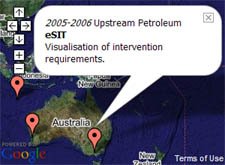
What you put on your map depends on your business. IE's projects are based in remote location all over the world, so I'm going to mark the locations of our projects and provide a little information about each of them. It's an effective way to provide a list of our successful projects and our global coverage. For real-estate or travel sites the use here is obvious, if your business is entirely local, you could put up a map of your exact location.

I've put my map on my support site, but it could just as happily live on the main site, YMMV.

Realtime Client Support with GoogleTalk

GoogleTalk is a great tool for interacting with your clients. The ability to support your customers using IM or voice is the way of the future. Maximise the potention by using Google Apps for Your Domain, create a new alias specifically for client support enquiries. I'm setting up Support@Intervention.com.au. Because we're using GMail, we can use GoogleTalk for IM, VOIP, and Voicemail -- as well as a centralised support email address.


Using hosted GMail nicknames you can shift the responsibility for online support to suit you, without needing to log on to different accounts or change contact details. Your clients email / IM / talk to support@intervention.com.au -- but support is a nickname for me or Stuart depending on who's rostered.

Share Knowledge with Google Coop

I' ve already written an article on Gaining Trust with Google Coop, it gives a decent idea on how I think Coop should be used. I won't go on for long now, but essentially, you can leverage your existing knowledge by making it available to subscribers to your Coop profile. Once people are subscribed, your rankings and subscribed links will affect their search results. If done well Coop can form an excellent part of your communications strategy.

I'll talk more about coop in a later week when I discuss how to increasing your public profile and becoming an influencial voice in the online community.

Next Week

Project Management

This one is going to take a bit of effort on my part, I'm going to use Google Apps for Your Domain, Spreadsheets, Writely, Blogger, Calendar, Google Desktop Search, and the Calendar API to manage a project.

It's going to include timesheeting, invoicing, scheduling, and internal discussion tracking. I'm going to need to write a couple of applications that make use of Google's APIs to help smooth this process along, so I'm going to be busy, but I should have a couple of cool tools to share when I'm done, so keep tuned!

Monday, July 24, 2006

GoogleOffice (Beta): The Google Powered Business

[ Google Office Tools Homepage Google Powered Office Articles ]


I loved Philipp Lessen's '55 Ways to Have Fun with Google', but I couldn't help thinking, 'What about when I'm not avoiding work?'. Google's great as a distraction, but it's also vital for getting my work done. As a playful response to Philipp's book, I'm going to show you the best ways to Get Work Done with a Google powered office.

Background

Over the last 12 months, Google has released an astounding array of business related applications -- including a calendar, spreadsheet, word processor, and hosted email. Few are Enterprise ready -- in fact none of them are entirely mature (all are still in Beta or Labs) -- but
importantly all of them are available gratis, and I'm not Sony or Nestle, so my QA standards are a little lower.

It's not just these 'Office Suite' style products that you can use for your company. Services like Alerts, Notebook, Maps, Co-op, and Google Groups (to name a few) can become invaluable tools for your business.

The Plan

Each week fortnight I'll post a new article on either how to:
  • Replace an existing business function with a Google alternative
  • Get the most out of a particular Google service in the workplace environment.
To focus my attention (and 'eat my own dog food'), these articles will be based on my experiences as I transform Intervention Engineering into a Google Powered company.

Hopefully the end result will be a useful guide for those contemplating a switch to a non traditional office IT setup, or for those simply looking to get the most from Google's many services.

What to Expect

My approach will be fairly haphazard, but I'll try to cover a wide selection of services rather than focusing too heavily in one area at a time. Requests are welcome and feedback gratefully received. For a list of articles, updated as they're completed, check out Google Office Tools.

In addition to the weekly fortnightly post, I'll also be maintaining a collection of Google Notebooks to summarize my findings. They'll be dynamic, and I'll update them regularly with new ideas, changes to Google's services, plus suggestions and feedback from you guys. Each article will link to applicable notebooks -- plus I'll keep a GoogleOffice index notebook here.

Along the way I expect to make reference to non-Google products which adhere to the same philosophy -- products like FireFox and OpenOffice -- but Google will be the primary focus.

At the end of each post I'll announce the subject for the next week, if you have specific questions regarding the topic, send me an email or leave a comment and I'll make sure to address it in the article.

Next Week's Preview

Business email

Every business needs a powerful and robust email solution. Many of you have probably used GMail before, but some of you may not be aware of Google's hosted GMail for your domain. A service that lets you use GMail for your business email domain.

I'll be looking at using a hosted GMail account for my business, and will look specifically at:

  • The business case for switching to a Google hosted email solution.
  • How to set up hosted GMail for your business.
  • Using email alias, labels, filters, and mailing lists to optimize your email experience
  • Google Alerts and Google Groups with GMail
  • GoogleBerry -- Mobile GMail for email on the road

Thursday, May 25, 2006

Upcoming Book Release Google Onebox

For those of you who -- like me -- need to know exactly when your favourite authors' next books are coming out, the upcoming book release Google Coop subscribed link, may be just the thing.


There's different results tailored for both the US and UK markets, so once you're subscribed to my
Google Coop profile, any Google search in the form

next
author book in the UK (or US)

for a
tracked author will provide a onebox that includes:
  • The name of the next release.
  • The expected date of release in that country.
  • Any series information (Ie. Book 2 of SomeSeries).
  • A link to pre-order the book at Amazon.
  • A link to add a reminder for the release on Google Calendar.
  • A link to the best source of more information about the release.

A full list of the authors I'm currently tracking is available at my
tracked authors page. I've started with the authors I already track for myself, but the list will grow as I find out whose books you want tracked, so let me know!

Friday, May 12, 2006

Cricket Subscription Links and Google Coop: A How and Why Guide

The Short Version

Cricket ground details and fixtures in a Google onebox, now available via my
Google Coop subscription links.


The Long Version (Including the 'How' and 'Why')


Google had a big day Wednesday, announcing the release of Google Trends, a new Google Desktop release, the upcoming release of Google Notebook, and most excitingly -- Google Coop.

Philipp has already provided a good Coop overview, so rather than rehash old ground I'm going to explain the reasoning and process behind creating the International Cricket subscription links.


Note: My
Google Coop Profile provides live previews of these links along with the ability to subscribe to them.

What and Why

As frequent readers will know, I'm a cricket fan, enough so that I created The Cricketing Yak.

The site includes a Google Map of test cricket venues, and while building this I found it unusually hard to find fairly basic information about many of the grounds -- things like official web sites and precise stadium locations took far more than just searching for the ground's name or city.

Now Coop
let's me provide a better solution, by putting these details where I expect them -- in the search results. Coop subscription links let you define a search query pattern, and then a onebox result. Anyone subscribed to your profile gets this onebox when a search they execute matches your pattern.

What to Show?


Each onebox can have three lines of text (with links), plus a title and 'more link'. This limits the information you can display, though as a user it ensures you're results are uncluttered.

As a guide I'd suggest:
  1. No spamming! (more on this later).
  2. Show only the information people are going to find useful for this specific query.
  3. Save users time by linking to related services (maps, calendar, email, etc.).
  4. Only link back to your site if it provides useful additional information.
My philosophy is to keep the result concise and relevant -- and I've done Google's job for them, by providing links to related Google services (map and calendar).

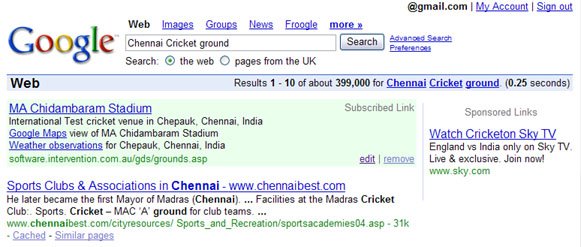
For the cricket venue box, I chose to display:
  • The full ground name with a link to the official web site as the title and more link.
  • The type of cricket venue it is, with the city/country location.
  • An exact Google Maps view of the ground.
  • A link to local weather observations from the venue's city .
Notice anything missing? No link to my site! Why? Because the other information is more relevant.

I don't have much more useful information at my site, so there's no value to the user in directing them there.

For the cricket match schedule box I'm showing:
  • The next scheduled match at the ground (with the date and match description) as the title.
  • A link to add the match directly to your Google Calendar (tricky!)
  • And this time I'm including a link to watch the live scores at The Cricketing Yak.
Potential Downsides? Losing Traffic!

I'm providing useful information, previously available at my web site, directly within the search results -- and in one case, I'm not even linking back to my site. Seems like an unusual way of gaining traffic 'eh?

True, but it goes a long way towards building trust and with only four lines/links, you might have more information to share -- if so, link to it -- but make sure the link makes worth their while. Don't just spam them!


Potential Upsides? Gaining Trust and Authority!

Losing traffic may seem like a Bad Thing, but what you're trading in is trust.

Google Coop lets trusted contributors affect the search rankings by using topics and labels. As a web site owner this is a Very Good Thing. But it only works for people subscribed to you, and to get (and keep) subscribers, you need to maintain their trust -- spam them and you'll lose them.

By providing relevant, useful information, you encourage users to trust you and stay subscribed -- meaning your site labeling will be affecting their search results. It's very white hat SEO, as your success at drawing visitors towards your site depends entirely on your ability to maintain their trust.

Break that trust and they can (and will) ignore you with a single click.

Update (28/05/06): See also my Upcoming Book Release subscription link.