
While we're yet to see a real-life GPhone, Google's mobile development team has just released a flurry of updates.
Monday saw GMail for Mobiles get bumped up to version 1.5. The shiny new version is 30 to 80% faster, lets you save drafts, and supports GMail keyboard shortcuts. The most impressive feature in the new version is a 'Contact Manager'. It displays your contacts' GMail pictures and their (click-to-callable) phone numbers -- as well as email addresses of course. Download on your phone from http://gmail.com/app.
Saturday saw Google Maps for Mobile get tricked out with version 1.6, with the bonus of native app support for the S60 OS toting crowd (Nokia, SE, etal). This is particularly cool as it provides GPS support for S60 phones (like the Nokia N95). Other updates include a touch-screen friendly zoom in / zoom out and menu options.
Today we get to view our Google Docs on our phones as Google release a mobile friendly view of Google Docs. Google Blogoscoped has the scoop, but in a nutshell mobile Docs supports a read-only view of both documents and spreadsheets (no presentation view yet).
We've now got Maps, GMail, Docs, Picasaweb, Reader, iGoogle, News, and Calendar all available on our mobiles. GPhone or not, Google is serious about moving to the mobile.
Showing posts with label gmail. Show all posts
Showing posts with label gmail. Show all posts
Wednesday, October 17, 2007

Thursday, January 04, 2007
A Response to 'Cracks Spread in Google's Armor'
I've just been reading 'Cracks Spread in Google's Armor', an article by Cody Willard published on RealMoney yesterday and on TheStreet.com today.
In it Cody describes three key 'fumbles' which he considers an early sign of the Google's potential downfall. It's a common theme this year with many Internet prognosticators suggesting that Google's 'golden age' is starting to tarnish, with some even suggesting that it's time to find the next Google.
It's an interesting theory and one that deserves discussion, unfortunately at least one of Cody's three points is patently false. Cody's second point decries Google abandoning its much trumpeted Gmail API strategy. He makes a strong arguement, the problem is Google's never offered an API to control Gmail, let alone one which supported "hundreds of applications".
I assume that the API he's referring too is the SOAP powered search API, which was shut down late last year to a chorus of dismay. Gmail offers POP access and some RSS feeds of mail, but no API (that's not stopped individuals reverse engineering the Javascript to develop their own hacked APIs mind you). I'm not saying that Google abandoning their search API is not a very bad thing, it is. But that's not what Cody is claiming.
Cody's remaining points focus on content agnosticism, particularly in Google Video, and net neutrality. I agree with him that CA is going to be a big issue with Google, the recent outrage on their insertion of 'tips' in search results bears witness to that. Much has been written on the net neutrality issue, so I'll simply say I disagree with him (and agree with Google) on that one and leave it at that. But at least these two points actually exist.
To add a concern of my own, I'd say Google's lack of transparency -- particularly its poor record of communication with developers looking to use Google's systems as a back-end to their own applications -- has the potential for Google's undoing. If in years to come a competitor arrives with services as good but offering robust and transparent APIs across the board, Google could be in trouble. Of course it's not too late for them to turn it around, and their recent work on gData APIs is a step in the right direction.
In it Cody describes three key 'fumbles' which he considers an early sign of the Google's potential downfall. It's a common theme this year with many Internet prognosticators suggesting that Google's 'golden age' is starting to tarnish, with some even suggesting that it's time to find the next Google.
It's an interesting theory and one that deserves discussion, unfortunately at least one of Cody's three points is patently false. Cody's second point decries Google abandoning its much trumpeted Gmail API strategy. He makes a strong arguement, the problem is Google's never offered an API to control Gmail, let alone one which supported "hundreds of applications".
I assume that the API he's referring too is the SOAP powered search API, which was shut down late last year to a chorus of dismay. Gmail offers POP access and some RSS feeds of mail, but no API (that's not stopped individuals reverse engineering the Javascript to develop their own hacked APIs mind you). I'm not saying that Google abandoning their search API is not a very bad thing, it is. But that's not what Cody is claiming.
Cody's remaining points focus on content agnosticism, particularly in Google Video, and net neutrality. I agree with him that CA is going to be a big issue with Google, the recent outrage on their insertion of 'tips' in search results bears witness to that. Much has been written on the net neutrality issue, so I'll simply say I disagree with him (and agree with Google) on that one and leave it at that. But at least these two points actually exist.
To add a concern of my own, I'd say Google's lack of transparency -- particularly its poor record of communication with developers looking to use Google's systems as a back-end to their own applications -- has the potential for Google's undoing. If in years to come a competitor arrives with services as good but offering robust and transparent APIs across the board, Google could be in trouble. Of course it's not too late for them to turn it around, and their recent work on gData APIs is a step in the right direction.
UPDATE: I've had the opportunity to try and clarify the issue with Cody. He maintains that, "They most certainly did and still do offer a gmail api. But they've reduced its functionality.". When I asked for references or links he suggested I search for 'Gmail API' on Google. The results feature dozens of links to an unofficial (and unendorsed) open source user created API written by Johnvy Hwang. Cody seems to have confused this unofficial, unendorsed, and unsupported project with a real and official Google API, which it most certainly isn't. Whoops.
Thursday, November 02, 2006
Google Launches New Mobile GMail
Google's just announced a new version of mobile gmail. According to the press release it's US/Canada only, but I've just downloaded it in London and it works a treat!
It's a Java applet that works on any J2ME enabled phone and provides the cool GMail stuff like conversations view, searching, stars, and attachments
It looks really slick, very much a GMail feel and it's lightning quick. I was a big fan of the old-style mobile GMail and this is a big improvement over that. Check it out on your mobile by pointing it to gmail.com/app.
It's a Java applet that works on any J2ME enabled phone and provides the cool GMail stuff like conversations view, searching, stars, and attachments
It looks really slick, very much a GMail feel and it's lightning quick. I was a big fan of the old-style mobile GMail and this is a big improvement over that. Check it out on your mobile by pointing it to gmail.com/app.
Tuesday, August 08, 2006
GoogleOffice Part 1 : Business GMail
[ Google Office Tools Homepage Google Powered Office Articles Gmail for Business Notebook ]
Desktop email clients are old and broken. The new hotness? Web based email for your domain.
It was sometime around 1999 when email at work stopped being a useful convenience and started being a necessary evil. Until recently, web based email was Outlook's ugly step child. You would never have considered something like Hotmail as a business email client (rightly so!) -- in fact people actually used Outlook Web Access for Exchange to access work email via the web(!).
Why not a normal GMail account?
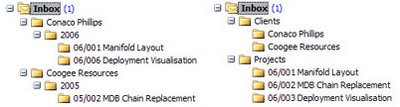
The first layout is highly structured and needs careful maintainance. The second effectively forces you to have multiple copies of each email in different folders. Ouch. Filing with folders is a poor metaphor for email, and labels are the solution.
Labeling for Business
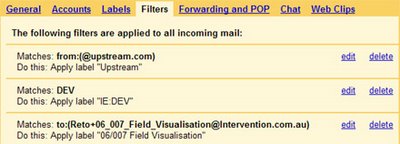
Create a label for all your: clients (Upstream), projects (06/007 Field Visualization), and products (IE:DEV). Add all relevant labels to each email. In paper-land this is stupid. To search, you'd have to go through each piece of mail to find the ones with the label(s) you want -- but GMail does exactly that, in about 3 nanoseconds -- so it works!
Now label your emails auto-magically, as they arrive, with a few simple filters. Emails will then be presented in your inbox with the right labels pre-applied. At a glance you can see what each email is about without having to open it.

Your inbox will be populated with messages pre-labeled by client, project and product. Unlike Outlook, GMail doesn't presume that labeling something means it doesn't still belong in your inbox.
Email is good, a web presence is better -- but excellent customer communication should be dynamic. Next time I'll talk about creating a company blog, using Google to add dynamic (ad free) content to your webpages, providing real-time support and interaction with clients using GoogleTalk/Chat, and using Google Coop to become a part of their everyday web searching.
Desktop email clients are old and broken. The new hotness? Web based email for your domain.
In many ways GMail is the cornerstone of my GoogleOffice. So for Week 1 I'll spend some time justifying GMail, before passing on some tricks. This is a big topic, so I'll leave most of the crossovers with other Google services for when I discuss them specifically later.
It was sometime around 1999 when email at work stopped being a useful convenience and started being a necessary evil. Until recently, web based email was Outlook's ugly step child. You would never have considered something like Hotmail as a business email client (rightly so!) -- in fact people actually used Outlook Web Access for Exchange to access work email via the web(!).
Background
I know people who return from a week's holiday and delete their whole inbox."If it's important they'll send it again"Seriously. Is that how to do business? GMail has instant search results and lets you filter and label, so you can quickly get to the important stuff in an overcrowded inbox. These days you expect to be online, so you can download just for a local offline 'cache' or backup. This alone will change the way you think of business email. Gmail is a strong Google offering. Gmail for your domain is a robust, web hosted, email alternative that still provides POP3 access for local copies.
Using GMail for Domains For Your Company's Email Hosting
Enough evangelising, on to business. Let's look at:- A business case for justifying the switch to GMail for your domain.
- How to get a hosted 'GMail for your domain' account.
- Using labels and filters effectively.
- Some tricks and tips for maximizing GMail's effectiveness.
A Business Case
Here's a short list of reasons for you (or your boss) to switch to GMail:- 2Gb online storage capacity. All your emails are accessible from a web interface, plus you've now got a robust offsite backup strategy.
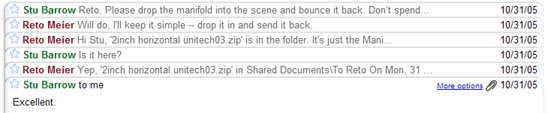
- Conversation View. One of GMail's most addictive features. 'Email chains' are displayed as conversations, grouped together with their replies, including all different participants over long durations. Once you've had this for business you'll wonder how email could ever have worked without it.

- Instant search. Search the complete email text; search by sender, recipient, date, or label. Search in Outlook is so ridiculous it's been relegated from both standard Windows search shortcuts -- 'tis neither F3 nor Ctrl-f (it's F4) -- my recommendation? Hold down Alt before you trigger your next search in Outlook.
- One SMTP server for outgoing mail. If you're using a desktop client, you can use Google's outgoing mail server no matter how you connected.
- Use Google Calendar within your company. Share calendars and events using your domain email addresses instead of separate GMail ones.
- Great web interface. Better than anything your ISP will provide, better in fact, than any desktop client will provide.
- Excellent spam filter. Invaluable in a business environment; I've had zero false positives and only 5% of spam slips into my inbox.
- Presence and Instant Messaging. GoogleTalk and GMail chat provide presence and IM between all your workers (and your clients). All your IMs are logged in your email -- as part of the email conversations that spawned them. For privacy you can go 'off the record'
- VOIP with Voicemail. GoogleTalk has VOIP functionality, and these days also lets you receive VOIP voicemail in your GMail inbox. Sweet.
- Email aliases for business roles (and individuals).
- Internal mailing lists.
- Mobile phone access. Via GMail mobile access.
- GMail for your domain is free.
Why not a normal GMail account?
- For business email? Seriously, if it's work, you've got to be sending it from your business domain. Maintain your brand and professionalism while taking advantage of GMail functionality.
- Hosted email is more stable than its public cousin.
- Google Calendar is fully integrated -- more on this later.
Getting GMail for Your Domain
Happily, this process is straight forward. Go to https://www.google.com/hosted and click 'I'm Interested'. You'll need to be logged in on a Google Account. Answer a series of questions about your company, the most important are 'number of users' and 'why do you want it?'. Be honest. For tips on the latter, look above at the business case :)It'll take a couple of days to process, so far I've seen either 25 or 100 accounts provided. If you've got a requirement for more, contact Google -- they've provided GMail for domains for several universities already.
Filing with Labels and Filters
Every company I've worked in has issues with email filing. In business it's vital to easily track:- Full conversation threads/chains. Particularly contract negotiations and/or disputes.
- All emails from anyone at a particular client.
- Any correspondence from anyone mentioning a particular product or service.
- Emails from everyone to do with a particular project.
The first layout is highly structured and needs careful maintainance. The second effectively forces you to have multiple copies of each email in different folders. Ouch. Filing with folders is a poor metaphor for email, and labels are the solution.
Labeling for Business

Create a label for all your: clients (Upstream), projects (06/007 Field Visualization), and products (IE:DEV). Add all relevant labels to each email. In paper-land this is stupid. To search, you'd have to go through each piece of mail to find the ones with the label(s) you want -- but GMail does exactly that, in about 3 nanoseconds -- so it works!
Now label your emails auto-magically, as they arrive, with a few simple filters. Emails will then be presented in your inbox with the right labels pre-applied. At a glance you can see what each email is about without having to open it.
- Clients. You know Bill works for 'Upstream' so create a filter that labels any of his emails as 'upstream'. Do the same for anyone else at Upstream -- or anyone with an @upstream.com.au address.
- Products and Services. Create a 'Has the words' filter for all your products and services. Any mention of 'IE:DEV' or 'DEV' will get labeled accordingly.
- Projects. GMail features '+' notation, so you can create arbitrary email addresses of the form 'Reto+ThisCanBeAnything@intervention.com.au'. GMail will deliver them to you with the full name. Why does this rock? For each project, create a new email address using + notation (Reto+06_005@Intervention.com.au). Distribute this email to other project members, and set it as your reply-to address when you send project email. Then just add a filter that applies the project label whenever you receive an email addressed to this new address. Sweet!
Your inbox will be populated with messages pre-labeled by client, project and product. Unlike Outlook, GMail doesn't presume that labeling something means it doesn't still belong in your inbox.
Tips and Tricks
I've included a bunch of tips and tricks under links below, but here are a few that are particularly useful at work. There are plenty more I'll go over, but most of them relate to using GMail with other Google services, so I'll talk about them later.- Create and share a label in Google Reader specifically for internal broadcasting using Webclips within GMail.
- Get mobile access to your important business emails. Creating a standard GMail account and use filter rules to auto-forward all important messages to this account. Auto-forwarding lets you use any number of any filter rules to forward messages.
- 'Save searches' with browser bookmarks. Perform a search in GMail, then create a bookmark in your browser. Opening this bookmark will open GMail with the search performed.
This works for any complicated search -- like your two top clients in 2006: (label:BHP OR label:Woodside) AND (after:2006/01/01). - Similarly, you can save a bookmark for composing new messages.
- For those of you who can't let go of a desktop client I know of two options:
- Opera. Opera's mail client supports labeling exactly the same way as GMail. Point of fact, Opera was doing it first.
- Hosted GMail Client (Unofficial). I've never used this but could be worth a look.
- Any other POP3 desktop email client. GMail provides POP3 access to your email so you can access it from any desktop client.
Useful Links
- Business GMail Notebook
- GMail for Your Domain
- GMail Tips, Ticks, and Secrets from About.com
- GMail Help Center
Next Time
Communicating with Clients and Customers -- Google StyleEmail is good, a web presence is better -- but excellent customer communication should be dynamic. Next time I'll talk about creating a company blog, using Google to add dynamic (ad free) content to your webpages, providing real-time support and interaction with clients using GoogleTalk/Chat, and using Google Coop to become a part of their everyday web searching.
Tuesday, February 07, 2006
Google Integrates Chat with Mail
Now this is a beauty. Google is in the process of integrating GoogleTalk with GMail.
They're doing this in a number of ways. First off, the much anticipated ability to record your chat history within your gmail account (with the ability to go 'off the record' during any conversation that will prevent both sides of the conversation to stop logging.
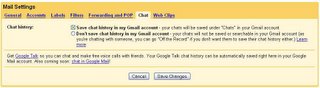
More impressively, chatting and presence have both been integrated directly into the gmail interface.

A small presence window shows you your contact list with status messages and presence. Clicking on your contacts will launch a chat window within GMail, which can be un-joined into a separate pop-up window.
It's a very neat combination that looks good and just the way you'd think it should. It's the next logical step in web-based mail and after the disappointment of Google Video it's good to see Google have done this right.
Google say they're rolling this out now, so expect to see it in your GMail interface soon.
They're doing this in a number of ways. First off, the much anticipated ability to record your chat history within your gmail account (with the ability to go 'off the record' during any conversation that will prevent both sides of the conversation to stop logging.

More impressively, chatting and presence have both been integrated directly into the gmail interface.
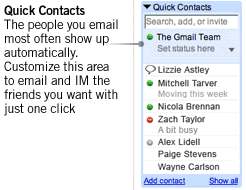
A small presence window shows you your contact list with status messages and presence. Clicking on your contacts will launch a chat window within GMail, which can be un-joined into a separate pop-up window.
It's a very neat combination that looks good and just the way you'd think it should. It's the next logical step in web-based mail and after the disappointment of Google Video it's good to see Google have done this right.
Google say they're rolling this out now, so expect to see it in your GMail interface soon.
Friday, January 06, 2006
Google Partnering with Intel and Motorola
Google's announced two new partnerships (perhaps alluded to earlier when they denied impending production of 'Google PCs', instead referring to their existing 'great partners'?).
The first is a partnership with Intel to leverage the Viiv platform for bringing Google Video to your living room, the second an alignment with Motorola to add a 'single click access' to Google on a number of their devices.
The Intel announcement is an interesting fusion of the two big rumors floating around the net -- the WSJ predicts a relaunched and expanded Google Video service with the ability to buy video from content provider, and the LA Times article predicting a Google hardware device that many hoped would be some sort of home-Google gateway for search and video.
Personally, I hope it is a combination, with Google announcing the updated Google Video service, as well as a Google branded Viiv box. I mean seriously -- how long until I get my Google-Viiv powered video on-demand+PVR set-top box?
So. How many hours until Larry's keynote at CES??
The first is a partnership with Intel to leverage the Viiv platform for bringing Google Video to your living room, the second an alignment with Motorola to add a 'single click access' to Google on a number of their devices.
The Intel announcement is an interesting fusion of the two big rumors floating around the net -- the WSJ predicts a relaunched and expanded Google Video service with the ability to buy video from content provider, and the LA Times article predicting a Google hardware device that many hoped would be some sort of home-Google gateway for search and video.
Personally, I hope it is a combination, with Google announcing the updated Google Video service, as well as a Google branded Viiv box. I mean seriously -- how long until I get my Google-Viiv powered video on-demand+PVR set-top box?
So. How many hours until Larry's keynote at CES??
Monday, December 19, 2005
Gmail On Your Mobile
I'd experimented with forwarding my POP mail to my mobile in the past, but it never really worked for me.
On the other hand, I've become completely addicted to using GMail, it's now the only email client I use. Handily, Gmail is now rendered in a mobile phone / PDA friendly format, including conversion of PDF to HTML and display images. Just point your phone's browser to: http://m.gmail.comOne really neat feature is 'reply by phone' as well as using your GMail contact list to make calls, so now I don't need to synch my contact list -- GMail handles it for me. Nice.
Now they just need to implement the long awaited Google Calendar and have mobile access for that, and I'll be set.
Subscribe to:
Posts (Atom)


