Showing posts with label mobile. Show all posts

Monday, March 26, 2012

Understanding Mobile Radio State to Build Apps that Don't Drain the Battery

tl;dr: Read the new Android Training Class, Transferring Data Without Draining the Battery, to learn how to potentially halve the battery life impact of your apps' data transfers based on the underlying radio architecture.
One of the beauties of modern smartphone platforms is the abstraction of underlying hardware.

I've been building mobile apps for almost 5 years, and had no idea how the underlying 3G radio worked. I didn't have to. I just open a connection and start downloading data.

Dalvik negotiates a transport mechanism to ensure I get the fastest and most efficient data connection possible. Wi-Fi or mobile, Edge or LTE, it doesn't matter. Or so I thought.

We all know that data transfers on mobile radios chews up a lot of battery, so we're careful to restrict how much we download. It's a balance between app latency and chewing up bandwidth and battery life.

Turns out it's not so much the amount you transfer, but how frequently you power up the radio.

The problem with abstractions is that hiding the complexities means disguising some possible optimizations—something I came to learn after speaking to the good folks at at AT&T and DoCoMo.


Optimizing Downloads for Efficient Network Access explains that to minimize the power drain associated with the mobile radio, it will go into standbye mode whenever it's not in use. Before you can upload or download data the mobile radio needs to be powered-up. Powering up from standby introduces around 2 seconds of latency when making data transfer requests.

No one wants to wait an extra 2s every time they try to follow a link, so rather than dropping straight back to standby, there is a tail-time during which the radio stays active to reduce that latency.

The exact numbers vary depending on the carrier, but once you stop transferring data the radio stays on—at full power—for around 5 seconds. Then stays at a "low energy" state (which introduces some latency, but uses less battery) for around another 12 seconds.

Every data transfer session will cause the radio to draw energy for almost 20 seconds.

As an app developer, knowing that every time you touch the network you can draw power for nearly 20 seconds should have a dramatic impact on the way you structure you data transfer routines.

That includes prefetching, batching your downloads, eliminating redundant downloads, and prefetching even more aggressively when using higher bandwidth (but more power-hungry) radios.


Learn more at Android Training

This is just a brief summary, my Android Training class: Transferring Data Without Draining the Battery teaches you more about the underlying radio hardware, how to use that knowledge to optimize your apps' battery impact, and how to analyze your apps' current transfer profile.

Monday, August 09, 2010

The Future of Mobile: Invisible, connected devices with infinite screens

The history of smartphones looks something like this: At the end of 2008 the very first Android handset was available on T-Mobile in the US. The iPhone has existed for 3 years. The very first Blackberry featuring push email came out in 2002.

From WAP and push email to iPhone in 5 years. From one iPhone to 60 different Android handsets in under 3 years. At that rate it's challenging to create a credible mobile roadmap that extends as far as 6 months - and the rate of change is increasing.

At the current rate, nearly anything is possible in 20 years

Lately a lot of people have asked me what I think is the future of mobile. Some people just want to know what device they should buy at Christmas, but others are looking for a 20 year outlook. 20 years!  The first GSM network had barely launched 20 years ago! Predication at that scale is destined for failure and embarrassment. But I won't let that stop me.

Bigger screens are better

Mobile devices are morphing. Tablets have been talked about for years, and the iPad and Kindle provide the kind of experience people have been waiting for. Browsing pictures, watching videos, and reading books work really well on a screen that size.

Still, I find the iPad heavy and bulky. The ultimate device would be the size and weight of my mobile but include a screen that could be unfolded or rolled out to provide a better display for watching movies and playing games.

Actually, the ultimate device would be entirely virtual. I’d put on my glasses (or contact lenses) and look at any surface to see an augmented version of reality. Anything from interactive holographs, to augmented reality, or a cinema screen that stretches across the horizon. Everyone could see their own version of reality on a screen the size of their visual field.
1 year  High res screens, tablet devices, and HD output from mobiles.
5 years  Flexible displays and built in HD projectors.
10 years  Transparent LCD patches that can be applied to regular glasses.
20 years  Contact lenses that project a visual feed directly onto your retina.
Full keyboards are better. No keyboards is best

Keyboard designs (like the that on the SE Mini Pro) continue to improve, as do on-screen keyboards with technologies like Swype.

The Nintendo Wii and Microsoft's Kinect suggest that gestures might largely take the place of keyboards and touch screens for some interactions. Better multi-touch and increasingly accurate voice input will make physical keyboards almost entirely redundant.

For those who want to write something longer than an email, gesture recognition (capable of tracking fingers), combined with eye-focus tracking will provide virtual full-size keyboards.

If we’re thinking long-term, we can look forward to research like this letting us control our devices using our minds.
1 year  Wireless keyboards, voice input, and gestures.
5 years  Larger multitouch screens, better gesture input, and flawless voice recognition.
10 years  Full virtual keyboards and voice input eliminate physical keyboards entirely.
20 years  Mind control.
Smaller devices that last longer

The Sony Ericsson X10 Mini is a ridiculous 83x50x16mm and weighs less than 100g. When screens stop being a primary consideration for device size, the devices will shrink dramatically.

That leaves the problem of  the battery. Mobile processors will become more efficient, and fuel cells may help battery life in the short term, but ultimately we’ll be powering mobile device using biology and ambient energy. Biokinetic and ambient energy will likely be the start, but the future suggests a move away from silicon and towards biological processors. The computer you inject is more likely to resemble a specialized virus than a tiny silicon chip.
1 year  Lighter, thinner devices that last longer.
5 years  Tiny devices powered by fuel cells.
10 years  Devices small enough to embed into watches and jewellery that never need charging.
20 years  You are the computer.
Connectivity will become ubiquitous

Cloud computing is already a reality. As even more of our data and processing is done in the cloud, continual and uninterrupted Internet connectivity will become increasingly critical.

The incredible growth of smartphones in countries with a mobile data infrastructure to support them is nothing short of phenomenal. It's easy to forget that the real powerhouses of mobile phone use are developing countries - countries that don't have a reliable infrastructure for traditional "wired" Internet access. Citizens there are likely to access the Internet exclusively via their mobile phones.

Over the next decade we'll see carriers (and new challengers) aggressively rolling out faster, more reliable networks and technologies that cover larger areas across the globe.

At the same time, you'll be using your mobile to control your TV, monitor your fridge, and start your car.
1 year  3G/4G and WiFi covers most of industrial world. Every mobile device comes with an unlimited (or high-cap) data plan. Mobiles start interacting with other consumer electronics and cars.
5 years  4G/5G and WiFi extend to cover the entire developing world.
10 years  Whitespaces or similar technology means everyone everywhere is connected at all times.
20 years  Connectivity is uninterrupted and ubiquitous. Losing connectivity is like losing power or running water.
What about calls!

Apparently some people use mobile phones to make and receive calls(!) As devices get smaller, keyboards become virtual, and screens move closer to your eyes, you'll need a separate piece of kit to sit near your mouth and ears. Bluetooth headsets will get smaller and more discrete, people apparently talking to themselves in public will become no less creepy or annoying.

Infinity screens, invisible devices, always connected

In 2030 you'll think of smart-phones as quaint anachronisms that died out about 10 years ago, now that all computing is mobile. You’ll be constantly connected to the Internet by a virus that lives in your bloodstream. Contact lenses will provide a truly infinite screen, and you’ll interact with your augmented environment through a combination of mental commands, physical gestures, and voice input.

We'll take all this for granted and complain that we still don't have jetpacks or flying cars.

Wednesday, February 25, 2009

eBooks, Kindles, and Mobiles

A couple of weeks ago Chris Webb (of publisher John Wiley & Sons) wondered if Amazon's decision to make Kindle titles available on a variety of mobile phones might be especially game changing.

Being an eBook skeptic I wasn't entirely convinced. A spirited discussion on Twitter (@retomeier / @chriswebb) followed, which eventually led to Chris putting my response up in full on his blog as 'Digital Books: Digital FAIL?'.

Saturday, November 15, 2008

Professional Android Application Development: Out Now!

Professional Android Application Development ships tomorrow (Tuesday) from Amazon US, so those of you who pre-ordered should be seeing your copies in a couple of days. I'm really excited and can’t wait to find out what people think.

Where to buy

If you're interested in a copy the best place for me, for you to buy the book is Amazon following one of these links:
Free stuff and resources

If you'd prefer not to fork out without knowing a little more about what you're paying for (or just don't want to fork out at all), here's some useful resources that come free of charge:

Chapter 1 is available as a free PDF download [pdf] from the Wrox site if you want to learn more about Android before you commit to a 400 page tome. The TOC and index are there too. Chapter 7 [pdf ] -- which focusses on maps, location-based services, and the geocoder -- is available too.

Every concept in the book is supported with code snippets and a bunch of detailed step-by-step examples -- all of which you can download from the Wrox Open Source site.

If you're looking for details on something specific, Amazon's "Search Inside" is a surprisingly useful resource.

Android development conversation

I'll be looking to answer Android questions at the Wrox P2P forums, StackOverflow, and the Android Google Groups.

You can follow me on Twitter or FriendFeed, or just get book related news from the books Twitter feed and Friend Feed Room. I'll tweet any 'bugs' and changes to the text or code samples, as well as updates on any SDK releases that cause book code samples to break.

Still to come

To celebrate the book release I'll be posting a bunch of stuff about Android, including tutorials, walk throughs, and open source projects -- both here and other places online.

As luck would have it I got my G1 last week, so I can finally test and tweek my Android applications, so expect to see announcements about them in the coming days and weeks.

Wednesday, October 17, 2007

Google Updates Its Mobile Offerings

While we're yet to see a real-life GPhone, Google's mobile development team has just released a flurry of updates.

Monday saw GMail for Mobiles get bumped up to version 1.5. The shiny new version is 30 to 80% faster, lets you save drafts, and supports GMail keyboard shortcuts. The most impressive feature in the new version is a 'Contact Manager'. It displays your contacts' GMail pictures and their (click-to-callable) phone numbers -- as well as email addresses of course. Download on your phone from http://gmail.com/app.

Saturday saw Google Maps for Mobile get tricked out with version 1.6, with the bonus of native app support for the S60 OS toting crowd (Nokia, SE, etal). This is particularly cool as it provides GPS support for S60 phones (like the Nokia N95). Other updates include a touch-screen friendly zoom in / zoom out and menu options.

Today we get to view our Google Docs on our phones as Google release a mobile friendly view of Google Docs. Google Blogoscoped has the scoop, but in a nutshell mobile Docs supports a read-only view of both documents and spreadsheets (no presentation view yet).

We've now got Maps, GMail, Docs, Picasaweb, Reader, iGoogle, News, and Calendar all available on our mobiles. GPhone or not, Google is serious about moving to the mobile.

Monday, June 18, 2007

The Google Phone


Last week His Jobsness announced the US release date for the iPhone (June 29 @ 6pm if you're interested) along with its revolutionary 3rd party API in the form of... a web browser.

As much as I'd love to be a part of the fanboi love-in, there's just no way I can justify the price (let alone the 2year contract lock in) -- shiny hunk of goodness that it is. Damn it to hell, but my 3yo SE 910i is more than adequate for making calls, checking email, and browsing the web.

My soul consuming desire appreciation of the iPhone is deferred by the phone I really want -- a gPhone, connected to all the Google goodness I use every day. Lucky for me, my Sony Ericsson also provides a developer API just like the iPhone(!) and Google has written a bunch of applications that support it!

Watch and marvel as I turn my Sony Ericsson P910i into a gPhone...

For easy phone reference, here's a link to a phone-friendly list without the commentary at: http://www.radioactiveyak.com/mobile.html
Note: If you've got a Java enabled phone, I'm going to recommend you use Opera Mini. I can confirm that it displays all the Google Mobile sites properly (colours and layouts are correct).

1. Google Homepage (iGoogle)

An excellent place to start your online mobile adventures. You can select which modules you'd like in your mobile homepage based on your desktop homepage here: http://www.google.com/ig/cp

I have mine setup to include news, reader, and mail feeds so my iGoogle Mobile page effectively provides shortcuts to the other mobile sites I use.

2. Blogger
· MMS (US Only)

In the US you get the simplest option using Google Mobile Blogging. Outside the US (and Americans with unsupported providers) it's just as easy using Shozu. Download and install the Shozu client and add 'Blogger' as a new destination.
IMPORTANT: There are two versions of Blogger available on the Shozu site -- one specifically mentions it is not compatible with the new Blogger. Keep looking! There's a new one that does.
Once you've installed the phone client and added Blogger as a destination you can send any picture as a new blog entry on Blogger. When you send, Shozu will let you set a post title and add some blog text. Your formatting options are limited, but it's a perfect way to blog on the road.

This is what a blog post from my phone using Shozu looks like. No post-editing was done.

If it's a text post your after, just enable the send-to address in you Blogger settings and add the email address from there to your gMail contacts.

3. Google Maps (and local search)
·
Java Midlet (www.google.com/gmm)

Java client that shows map or satellite view of most of the world using Google Maps. Includes local search, driving directions, and for select cities even traffic info. Confirmed to work in US, UK, Europe, and Australia -- but it should work for any location that Google Maps supports.

Lets you save favorite places for easy reference on the go. If your phone is GPS enabled it'll put a blue marker on your current position.

On my SE the 5 function scroll wheel lets me move the map up (scroll up), down (scroll down), left (scroll wheel back), right (scroll wheel forward), zoom (scroll wheel push).

4. Google Calendar
· Website (www.google.com/calendar/m) -- '(Google) Calendar'

The Google mobile calendar site will let you view your Google calendars in agenda mode.

It lets you select which calendars you want to include as well as specific event details and adding new events but lacks the ability to modify or delete events.

Alternatively if you're lucky enough to have a compatible phone, GooSync will synchronise your Google Calendar with your phone's native calendar for the low-low price of nothing. It supports updates, alarms, and two-way syncing. For a small subscription they support syncing to multiple calendars.

5. Picasaweb
· Upload:
3rd Party Client (www.shozu.com)
· Viewing:
Google Reader for Mobile (www.google.com/reader/m/) -- '(Google) Picasaweb'

Uploading Images
ShoZu provide an excellent free Java applet that's available for most Java enabled phones. You'll need to download their client and configure your account on their web site, as simple as adding 'Picasaweb' as a destination. Logging in to your Google account is handled the new safe Google authentication way.

Viewing Albums
In
Google Reader (desktop version) subscribe to each album you want viewable on your phone. Tag all the albums 'Picasaweb'. The RSS feed for each album is constructed like this:

http://picasaweb.google.com/data/feed/base/user/username/album/albumname?kind=photo
(For example:
http://picasaweb.google.com/data/feed/base/user/liz.jones/album/Diary?kind=photo)

Then navigate to Google Reader (
mobile) on your phone. Choose 'Filter by Tag' and select 'Picasaweb'. Then just bookmark the result -- '(Google) Picasaweb'.

Reader will show a list of photo names, clicking on an item will show a thumbnail of the image, but won't mark it as 'read' -- so the whole album will stay available.

6. GMail
·
Java Applet (www.google.com/mobile/gmail/)
·
Website (gmail.google.com) -- '(Google) Mail'
· POP3 (
setttings)

What's a smart phone without email?

The Java client is excellent -- very fast and supports most GMail functions. The web interface is good but lacks the bells, whistles, and speed of the Java client. The POP3 settings lose all your GMail features (like tags, stars) but work natively with your phone's email program. No push support though.

7. Google Reader (RSS Feed Reader)
· Website (www.google.com/reader/m) -- '(Google) Feed Reader'

Optimised mobile UI for Google Reader.

You have to set up your feeds in the desktop version, but then you can read and filter (by star, tag, or feed).

I read through the headlines and feed content, starring items I want to follow up when I'm properly online.

8. Google News
· Website (mobile.google.com/news) -- '(Google) News'

Shows Google News formatted for your phone. Lets you customize which news sections are visible, then you can expand or collapse whole sections at a time.

9. Google Search
· Website (m.google.com/m?uipref=3) -- '(Google) Mobile Search'

Newly updated, provides comprehensive mobile search that remembers your location to provide intelligent results for local businesses, movies, and weather.

10. Services Still Required

GMail Contacts
Take a leaf out of Yahoo's book and provide a GMail API. At the very least provide API access to contacts so someone clever can sync my Gmail contact list with my phone.

GoogleTalk (with Voice)
I want my voice enabled GTalk client straight from Google. Bandwidth be damned!

Google Docs & Spreadsheets
My phone has a built in Excel, Word, and PDF viewer -- I'd love it if I could view and edit my Google Docs and Spreadsheets. Maybe someone out there can write a service to sync my phone's Todo list with a Google spreadsheet?

Google Groups
I love Google Groups, please Google, give me a way to access them on my phone. Please?


So -- what else is missing? What do you want on your phone before your iPhone envy is quenched?

Thursday, May 24, 2007

Google Calendar for Mobiles

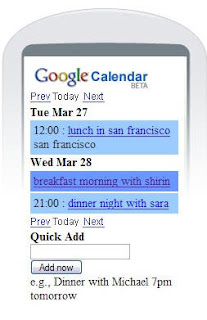
Google Calendar now supports a mobile phone web interface!

Just point your calendar to calendar.google.com and you'll see your agenda as well as the ability to add new events quickly and easily.

This is an excellent companion to the GMail app, and solves my 'which is my primary calendar' dilemma. Plus if you set up your calendar to send reminders via SMS alerts to your mobile you'll have a fully mobile calendar that's always in synch with your Google Calendar.