Showing posts with label google office. Show all posts

Monday, July 09, 2007

A Fuel Price Mashup: Web Development Goes Entirely Online

I put this mashup together to play with two new online tools -- the Google Mashup Editor (GME) and Yahoo Pipes. If you're interested in the process (and the effort involved), read-on in part 2 below. If you live in Perth, use the mashup!


Part 1: For Those in WA Who Want Cheap Petrol…

I'm not one for driving 50km out of my way to save 5c/L on petrol, but with unleaded approaching $1.50/L it's probably worth scouting out who's offering it cheapest around where you usually fill up anyway.

Fuel Watch has published fuel prices for years, you've probably seen the updates after the news alerting you to the cheapest petrol 'North of the river' (as though Subiaco was next to Mindarie).


Sign in and create a list of suburbs where you usually 'fillerup', then check which of the stations in your local areas have the best prices on the handy Google Map.

Part 2: ...Piping Chocolate into Your Mashup Peanut Butter

Lunchtime last Monday I got my invite to the Google Mashups Editor (GME) beta (Check out Philipp's introduction), that evening I decided to try it out.

In 48 hours this technology test project completely changed my view of web development. I've written mashups before (Live Cricket, Cricket Venues) but they're pretty basic -- static and read-only, with no personalisation. Worse, each took over a week to finish. This time, before I went to bed on Monday I was done. A couple more hours on Tuesday for the 20% stuff and I'm finished. In less than a day. Done.

The Technology
Overview

Development, debugging, hosting and deployment are done entirely online -- no local environment, editors, or builds. I moved between three different computers during the development and needed only to login to Google and Yahoo to have my development environment ready to go. For me this is a revelation. Gone, the time-wasting installation and configuration of a development environment, no finding, changing, and configuring paths and dependencies.

If you're a coder, chances are you remember the first moment that a change in a line of text affected what happened on the computer in front of you. That shift from passive viewer to active participant is what's driven a lot of us into the world of software development. These tools have given me that same feeling of empowerment over technology for the first time in years.

The Peanut Butter: Google Mashups Editor (GME)

The GME is an online development environment that lets you build Web 2.0 style apps based on RSS feeds. Crucially, it hosts your app and lets you define data structures and hosts read / write data sources on an application wide and a per user basis.

In real-life I'm a C# desktop developer, though I've tinkered in web development and I've used the Google Web Toolkit. The WA Petrol Price Map had a development time, from scratch to working prototype, of about 5 hours, probably a couple more hours for the polish.

A Step-By-Step to Creating a Mashup in GME

(Here’s the source code so you can follow along at home)
Google provide excellent sample projects that you can use as templates. Each editor page is essentially HTML, you use 'tags' to add all the goodies. So I start by laying out my page -- a header and footer, and a table to hold the map and lists.

You use gm:template tags to define data structures and how to display them. You also set the editability (if and how to display the add/edit/delete buttons). So next I create a template for the data to store - a list of suburbs w/ descriptions.

With the data structure defined, I add an instance of this to my UI with a gm:list tag, specifying the template and the data source. In this case I want it stored per user, so I use the ${user} reference. Then I add the petrol price list by adding another gm:list, but this time I don't specify a template, and I point the data source to the address of my RSS feed.

Then I add a gm:map tag for my Google map, and tie its data source directly to the petrol price list data -- ${petrolPriceList}. The map has built in support for goecoded fields, so I just need to specify the feed tags for lat / long.

Now I've got a list of user editable suburbs, a list of the cheapest petrol stations for the suburb selected, and a map of all the stations. The only thing missing is interactivity. GME uses gm:handleEvent tags for this. I tie the map and petrol station lists together by adding a 'select' event handler to both (they share the same data source, a select on one now selects the same item on the other.)

Finally, I make selecting a suburb update the RSS query I use to access the petrol prices. This needs JavaScript, so I add a select handleEvent tag to the suburb list and instruct it to execute a JavaScript function that updates the data source based on my suburb selection.

AND THAT'S IT. Done and dusted. I've seen the future of web development, and this is the way forward.

Some Quick GME Tips & Tricks:
  • Use Pipes for RSS feed manipulation, especially anything involving regex. Pipe’s visual interface is a thousand times better than writing JavaScript functions.
  • Get usage stats with Google Analytics.
  • Make sure users can make some use your mashup without signing in. People are reluctant to sign in without knowing what they're getting first.
  • Use a sensible title when you create your new project as that's what will appear in the Google powered login page.
  • You can copy a project in its entirety. Useful for using a sample project as a template, or renaming an existing project.
  • Host your data in Google Spreadsheets and use the Spreadsheets API for a feed to use in your mashups.
  • GME caches requests so you don't hammer your feed providers. This can result in stale data. Add a &frequency= parameter to your feed requests to ensure you get timely data. Concatenate part of the date/time for the update rate you need (Monthly? Daily? Hourly?)
  • You can store data either per user (using the ${user} data store) or per application (using ${app}). You can set access levels to application wide stored data to public, read-only, or members’ access only. Create a private mashup for family vacations by adding them all as members and cutting off public access.
  • The GME creates a Google Code project for each GME project, including a version controlled SVN repository.
  • Use JavaScript for access to the Map functions not exposed in the gm:map tag. (like turning on Traffic View, etc).
…and some existing problems:
  • The GME really didn't like either IE6 or IE7. I haven't experimented in FF yet.
  • Code formatting was wonky at best, and it was very easy to 'accidentally' delete text by using seemingly innocuous key sequences (shift-home deletes a line!).
  • This is definitely still in Beta. The generated code works flawlessly, but the editor itself is buggy as hell (which may be why they recently allowed you to edit offline). Luckily, the team is very receptive to comments and bug reports via the support forums.
  • Functionality is lacking, but more (by way of new tags) is on the way. With luck they’ll expand it to provide all the GWT functionality, and eventually make this the backend for Google Page Maker.
The Chocolate: Yahoo Pipes

Yahoo Pipes was a revelation. Manipulating feed items to modify and annotate fields, looking up and incorporating information based on feed item fields is the 'hard work' behind much of mashup development -- really any data driven development. Pipes makes this the easy part.

Pipes lets you make any RSS feed your bitch. Join feeds together, kick their contents with a regex boot, annotate them with lookups from other web services (like Google's geocoder), sort, filter, take user inputs -- whatever. This is real power, and it's implemented simply, visually and hosted entirely by Yahoo. No more spending hours writing and hosting a web service that does the same thing, say goodbye caching and bandwidth issues.

Here's how it worked for me.

The FuelWatch feed takes a suburb name as a parameter and returns an RSS feed in the form, [price]: [Station Name] - [Station Address].

Bring on the Pipes. I specify an input parameter (suburb) and join that with the FuelWatch feed address to generate my input feed.

Everything from here-on acts on every item of the feed, so I start by copying the title field into a new address field. Whack it with a regex stick to trim the address from the title field and clean up the address field. The foreach transaction lets me pass this address to the Google Geocoder, adding the result as a 'geocode' section on each feed item. A little more copying and a little more regex -- voila -- I've got glat and glong fields at the root level of my feed, perfect for a mashup.

Check out the completed pipe. Total creation time including registering with Yahoo and figuring out how to use pipes (and re-learning regex)? 2 hours.

Pipe Tips and Tricks
  • Use the 'copy' filter to duplicate fields, then you can perform different actions on each copy.
  • Use regex to modify each field until it contains exactly what you want.
  • The regex control works sequentially, so you can perform multiple changes on the same field one after the other.
  • Use the 'foreach' transform to add the results of a web-based lookup based on a field into each feed item (Eg. Add geocoordinates by passing an address to the Google Geocoder. Add photos by passing tags to Flickr).
  • Pipes lets you take CSV, RSS, and ATOM data as feed sources, then outputs it as either RSS or JSON.

The Future of Development?

This time last week I'd started a draft on how the move towards Internet applications was raising barriers for entry into the world of software development. On Monday afternoon my perspective changed.

I develop desktop apps in Windows; have done for the last decade. I can see the world moving to web based applications, but before Monday I was staying in the shallows, debating the value of investing the time and infrastructure necessary to develop a real Web 2.0 app.

See, if you want to write a desktop app all you need is a computer and a compiler. Distribution requires little more than an email account. To write a web app (and widgets != applications), you also need a server, database, and bandwidth. Without any server infrastructure, doing things like saving user data is non-trivial. Even if you host it yourself, you need an Internet connection with suitable bandwidth and a 24/7 server. That's a lot of overhead for a curious 12 year old, an experimenting student living on campus, or a consultant developer working on a laptop.

No longer. Google's Mashup Editor provides a framework for developers to define and save 'per user' and 'per application' data structures and hosts whatever application you produce. It is a Good Thing. Used with a data manipulation framework as powerful as Pipes and you don’t need anything but a computer connected to the Internet to develop and deploy a fully interactive web app without even owning a computer, let alone installing a compiler.

Now your development environment moves with you. If you're computer access consists of a computer you share with your family and the workstation at the school library, you can still write fully featured web apps just by logging in.

I'm still only dipping my foot in the deep end of web development, but if Google and Yahoo continue to develop tools like these, it won't be long before anyone with the desire can dive into full scale web development without a second thought.

Update (18/07/07) Read this new article on how to use Pipes to turn this mashup into an even more useful Mapplet.

Monday, June 18, 2007

The Google Phone


Last week His Jobsness announced the US release date for the iPhone (June 29 @ 6pm if you're interested) along with its revolutionary 3rd party API in the form of... a web browser.

As much as I'd love to be a part of the fanboi love-in, there's just no way I can justify the price (let alone the 2year contract lock in) -- shiny hunk of goodness that it is. Damn it to hell, but my 3yo SE 910i is more than adequate for making calls, checking email, and browsing the web.

My soul consuming desire appreciation of the iPhone is deferred by the phone I really want -- a gPhone, connected to all the Google goodness I use every day. Lucky for me, my Sony Ericsson also provides a developer API just like the iPhone(!) and Google has written a bunch of applications that support it!

Watch and marvel as I turn my Sony Ericsson P910i into a gPhone...

For easy phone reference, here's a link to a phone-friendly list without the commentary at: http://www.radioactiveyak.com/mobile.html
Note: If you've got a Java enabled phone, I'm going to recommend you use Opera Mini. I can confirm that it displays all the Google Mobile sites properly (colours and layouts are correct).

1. Google Homepage (iGoogle)

An excellent place to start your online mobile adventures. You can select which modules you'd like in your mobile homepage based on your desktop homepage here: http://www.google.com/ig/cp

I have mine setup to include news, reader, and mail feeds so my iGoogle Mobile page effectively provides shortcuts to the other mobile sites I use.

2. Blogger
· MMS (US Only)

In the US you get the simplest option using Google Mobile Blogging. Outside the US (and Americans with unsupported providers) it's just as easy using Shozu. Download and install the Shozu client and add 'Blogger' as a new destination.
IMPORTANT: There are two versions of Blogger available on the Shozu site -- one specifically mentions it is not compatible with the new Blogger. Keep looking! There's a new one that does.
Once you've installed the phone client and added Blogger as a destination you can send any picture as a new blog entry on Blogger. When you send, Shozu will let you set a post title and add some blog text. Your formatting options are limited, but it's a perfect way to blog on the road.

This is what a blog post from my phone using Shozu looks like. No post-editing was done.

If it's a text post your after, just enable the send-to address in you Blogger settings and add the email address from there to your gMail contacts.

3. Google Maps (and local search)
·
Java Midlet (www.google.com/gmm)

Java client that shows map or satellite view of most of the world using Google Maps. Includes local search, driving directions, and for select cities even traffic info. Confirmed to work in US, UK, Europe, and Australia -- but it should work for any location that Google Maps supports.

Lets you save favorite places for easy reference on the go. If your phone is GPS enabled it'll put a blue marker on your current position.

On my SE the 5 function scroll wheel lets me move the map up (scroll up), down (scroll down), left (scroll wheel back), right (scroll wheel forward), zoom (scroll wheel push).

4. Google Calendar
· Website (www.google.com/calendar/m) -- '(Google) Calendar'

The Google mobile calendar site will let you view your Google calendars in agenda mode.

It lets you select which calendars you want to include as well as specific event details and adding new events but lacks the ability to modify or delete events.

Alternatively if you're lucky enough to have a compatible phone, GooSync will synchronise your Google Calendar with your phone's native calendar for the low-low price of nothing. It supports updates, alarms, and two-way syncing. For a small subscription they support syncing to multiple calendars.

5. Picasaweb
· Upload:
3rd Party Client (www.shozu.com)
· Viewing:
Google Reader for Mobile (www.google.com/reader/m/) -- '(Google) Picasaweb'

Uploading Images
ShoZu provide an excellent free Java applet that's available for most Java enabled phones. You'll need to download their client and configure your account on their web site, as simple as adding 'Picasaweb' as a destination. Logging in to your Google account is handled the new safe Google authentication way.

Viewing Albums
In
Google Reader (desktop version) subscribe to each album you want viewable on your phone. Tag all the albums 'Picasaweb'. The RSS feed for each album is constructed like this:

http://picasaweb.google.com/data/feed/base/user/username/album/albumname?kind=photo
(For example:
http://picasaweb.google.com/data/feed/base/user/liz.jones/album/Diary?kind=photo)

Then navigate to Google Reader (
mobile) on your phone. Choose 'Filter by Tag' and select 'Picasaweb'. Then just bookmark the result -- '(Google) Picasaweb'.

Reader will show a list of photo names, clicking on an item will show a thumbnail of the image, but won't mark it as 'read' -- so the whole album will stay available.

6. GMail
·
Java Applet (www.google.com/mobile/gmail/)
·
Website (gmail.google.com) -- '(Google) Mail'
· POP3 (
setttings)

What's a smart phone without email?

The Java client is excellent -- very fast and supports most GMail functions. The web interface is good but lacks the bells, whistles, and speed of the Java client. The POP3 settings lose all your GMail features (like tags, stars) but work natively with your phone's email program. No push support though.

7. Google Reader (RSS Feed Reader)
· Website (www.google.com/reader/m) -- '(Google) Feed Reader'

Optimised mobile UI for Google Reader.

You have to set up your feeds in the desktop version, but then you can read and filter (by star, tag, or feed).

I read through the headlines and feed content, starring items I want to follow up when I'm properly online.

8. Google News
· Website (mobile.google.com/news) -- '(Google) News'

Shows Google News formatted for your phone. Lets you customize which news sections are visible, then you can expand or collapse whole sections at a time.

9. Google Search
· Website (m.google.com/m?uipref=3) -- '(Google) Mobile Search'

Newly updated, provides comprehensive mobile search that remembers your location to provide intelligent results for local businesses, movies, and weather.

10. Services Still Required

GMail Contacts
Take a leaf out of Yahoo's book and provide a GMail API. At the very least provide API access to contacts so someone clever can sync my Gmail contact list with my phone.

GoogleTalk (with Voice)
I want my voice enabled GTalk client straight from Google. Bandwidth be damned!

Google Docs & Spreadsheets
My phone has a built in Excel, Word, and PDF viewer -- I'd love it if I could view and edit my Google Docs and Spreadsheets. Maybe someone out there can write a service to sync my phone's Todo list with a Google spreadsheet?

Google Groups
I love Google Groups, please Google, give me a way to access them on my phone. Please?


So -- what else is missing? What do you want on your phone before your iPhone envy is quenched?

Thursday, February 22, 2007

Google Apps Now With Docs & Spreadsheets + Paid Premier Edition


Google Applications for Your Domain has had a face lift and now also provides Google's Docs & Spreadsheets.

The other big news is the availability of 'Google Apps Premier' -- a $US50 / year / account service (free until May) with 24/7 phone support, 99.9% GMail up time, single sign-on support, no Adsense, and email gateway support (say hello Blackberry users!). This page shows the advantages to upgrading or you can compare the differences between versions. Educational institutions get Premier for free!

For developers there's new APIs for Google Apps, including provisioning, single sign-no and email gateway interfaces. Applications that make use of these new APIs can only be used with the Premier edition.

This push makes Google Apps a serious threat to Microsoft's Office empire. Keeping in mind that for large Enterprises the thought of hosting their applications off-site is an anathema. Likewise power users of Office applications (Excel in particular) are unlikely to consider switching. Spreadsheets' lack of support for pivot tables, a scripting language, advanced formulas, and form components makes it a non-starter for a lot of organisations that use Excel for data manipulation.

But For smaller companies (or educational institutions), the power-tools available in Excel and the rest of the Office suite are less important than the ability to write a fax, tabulate numbers, and easily and securely collaborate on spreadsheets and documents.

For these users remotely hosted applications that actively support collaboration are very attractive. Particularly with the 24/7 phone & email support Google are offering. Indeed for some operations the cost savings in application support far outweigh the $50 a year Google are charging for their office suite and will count as a net positive.

As an aside, this means that my Google Timesheeting tool is much more closely tied. I've updated my recent blog post on timesheeting with Google and posted some suggestions for how to make the most of the integration at the Office Tools Group.

Tuesday, February 13, 2007

GoogleOffice Part 4: Timesheets

[ Google Office Tools Homepage Google Powered Office Articles Google Office Tools: Timesheeting ]

Everywhere I've worked timesheets have always been the source of rancour. Whether it's people not completing them on time, using the wrong project codes, using an old template, or having to fill out three separate forms every week - timesheets always seem more complicated than they need to be.

Outlook and Excel are the defacto tools for timesheeting, but putting aside that GoogleOffice is free, Google's Calendar and Spreadsheets are actually better suited to the job. The access controls and collaborative features of
Google Calendar and Spreadsheets streamline timesheeting in a Google Office.

Timesheets in Google Spreadsheets

Spreadsheet's collaboration and access controls make it excellent for timesheeting for a small business or an individual. Start by creating a timesheet for every employee, and sharing that (with write access) with your 'payroll' or 'timesheet' account

Annoyingly spreadsheets isn't part of GAfyD yet, so you'll need payroll to create a Google account for the job.

UPDATE: Spreadsheets now is available as part of Google Apps. So just share your timesheet with the same timesheet user you share your calendar with.

With payroll and staff both having access to timesheets everyone involved can 'sign off' electronically thanks to the built in revision control. Go one step further and share read access with any external agencies that might need timesheets (like agencies or umbrella companies for contractors). This prevents the seemingly endless duplication -- I've had to fill out 4 separate timesheets for a single contract.

Spreadsheets supports exporting to Excel/ODF and PDF so you can print or save backups. I personally save PDFs of all timesheets after I complete payroll to make sure there's always a backup once money's changed hands.

If you'd like to make things even easier, you can automate the 'filling in' part of the timesheet process by using my
Google Office Timesheet Tool.

Recording Time with Google Calendar

I recommend using calendar to track your daily activities on the fly. To make my life even easier I've written a Windows tool for
timesheet data entry that uses the calendar API to make this really quick and easy.

Start by using Google Applications for Your Domain to provide timesheet calendars for you and your staff. Create a 'Timesheet' account and invite it with read access to all your employee timesheet calendars. Then have your staff record their daily activities on their timesheet calendars, adding a new entry whenever they switch clients / projects.

That timesheet account can now get times for invoicing and timesheets without having to chase up every team member asking how long they spent doing what.

When you enter your activities make it easy on yourself by including the project or client in the title text - even if that's *all* you put in the title. If you get the level of detail right and make it a regular intraday activity this should take most of the pain out of timesheeting.

Some Timesheeting Tips

  • Create (and regularly update) a shared company wide 'Admin' calendar that includes staff meetings and public holidays. You and your staff can copy these admin activities straight to personal timesheet calendars.
  • Include a 'Make sure Timesheets are complete' task with a reminder in your admin calendar for the day before you usually process payroll.

Monday, February 12, 2007

Easy Timesheets with Google

[ Google Office Tools: Timesheeting Timesheet Quick Start Guide Downloads ]
[ Latest Version: 0.9.1 (18/02/2007) ]

I'm releasing a freeware single-entry timesheeting tool that uses Google's Calendar and Spreadsheets services to automate your timesheeting, making it as simple as possible.

Check out Timesheets at Google Powered Office Tools.


Simple Time Entry

Just add a new entry whenever you switch projects, and the tool will add it to your Google timesheet calendar. It tries to be smart by ending the last task when you start a new one, finishing your last task at the end of the day, and keeping track of your previous projects.

Easy Timesheet Creation

Sums the time spent on each project for each employee from their Google Calendars and fills in Google spreadsheet timesheets for each of them. Have your staff share their timesheet calendar with a 'Timesheet' user to create their timesheets for them with a single click!

I've created and shared templates for weekly, monthly, and yearly timesheet formats. Just login to Spreadsheets and choose import, then point them to the right location. Once imported, just rename the new spreadsheet for each employee (Eg. 'Reto Meier Timesheets').

Tuesday, February 06, 2007

GoogleOffice Part 3: Knowledge Bases with Google Groups

[*New*: Google Office Tools Homepage Google Powered Office Articles ]

Every techie knows Google Groups (formerly DejaNews, and in paleolithic times - Usenet) is the magic beans of software development, by itself it's justification for getting Internet access for developers. It is the best, largest repository of esoteric information on the net.

You may have noticed that a couple weeks ago a new version of Groups came out of Beta. When Groups-Beta was released I pretty much ignored it; It was always the content that was important - the group was just a category inherited from Group's origins with and dependence on Usenet. So other than looking more '2.0' what could Groups-Beta offer?

Google Groups is actually useful for business

Well, it's a substantive improvement in terms of functionality, Groups now features full read/write access controls; file, document, and web hosting; as well as the revamped discussion groups. Now you can create private knowledge bases full of development resources and use Google's technology and servers to host and search it.

Groups is not your Grand-Daddy's Usenet. Use it to:

  • Host private knowledge bases for you and your company, with resources for development technologies.
  • Host a client facing homepage for products, where users/customers are encouraged to participate in the support forums and where product downloads and documentation are readily available.
  • Create a resource site for your team's development projects, where team members discuss bugs & features and store project resources, QA builds, project plans, and documentation.

Knowledge workers need fast access to information

We sure as hell don't have email and 6Mb broadband to keep in touch with clients. We have tech forums and programming meetings to share development tips - it's what code reviews and pair programming is all about, your manager called it knowledge sharing. Most IT knowledge workers already use groups to search for information, so they're not learning any new behaviours

When we are keeping in touch with clients it's convenient (for you and them) to have a single point of contact rather than relying on interfaces with individual developers. Use groups to host your product downloads, support forums, and documentation.

Earlier I mentioned three things to store in a knowledge base:

  • Company specific (personal) knowledge about a particular technology
  • Development knowledge about a particular product
  • Customer facing (and customer contributed) knowledge for a particular product

Let's look at each more closely.

Create your own private (or company-wide) knowledge base

Access controls let you create a knowledge base with access limited to yourself or your company. I've created a private Group for each technology I use (currently one for Google code and one for C# development). I've invited each of my staff to become part of the group and encourage them to post clever resources like code-snippets, and to ask (and answer) tech questions within the forums. I also make sure everyone forwards email chains with problems / solutions into the discussion forum.

Because access is limited to the people you invite, you can post sensitive company questions / answers / code snippets / binaries without fear of public disclosure. The centralised archive means all the members have access to the same information as soon as they've been given access -- no more archives and forwarding mailing list emails to new staff. And the information is available on any Internet connected computer.

File hosting gives you somewhere to store cool icons, useful toolkits or 3rd party resources. The 'Pages' (or 'wiki' or 'documentation') section gives you somewhere to put company doco, like coding guidelines, naming conventions, FAQs, etc. The documents are collaborative and revision controlled (think Wiki) so staff can update them as required and everyone can see what's changed and when.

You also get the Groups' discussion forums, with all the usual goodness like staring, sticky posts, closed discussions, ratings, and threading. Staff can choose how they read and contribute to the group using email, digests, RSS feeds, browsing, or searching.

If you're feeling adventurous, check this out. I've also created a secret private 'me access only' group, but rather than posting snippets, I post full source code. All my source code. A full text, universally accessible, fully searchable copy of my code base. I know some of you just threw up a little in your mouths, and yes, it has risks. You can minimise them by obfuscating the code a little (remember it's not a source backup, it's a knowledge backup), remove all the headers at the top of each source file and kill all project / solution / package references -- anything that gives the files structure.

If I release a product I need to host it somewhere

At a minimum that site needs a descriptive homepage, support / discussion forums, access to the most recent downloads, and all the release notes, FAQs, and documentation.

Now I could build this myself, and it would be someone's job to update the info, monitor the server, and deal with the support emails. But me and my small staff don't have the skills or the inclination to do it properly, plus I'd rather the whole team participate in support to get a feel for what the users are saying. So rather than building from scratch I suggest creating a new Google group like this one for my Google Office Tools.

Write a 'welcome message' (effectively a homepage) with a description of your product with screenshots & PR material. You've got 100mb of file storage to host your downloads, and a built in support / feedback forum. Use the documentation tab to provide release notes, FAQs, how-to guides, etc.

Customise the look and feel by changing the colour scheme and fonts to bring the site in line with your product or your other websites. Using the 'navigation' tab in the settings, hide the 'members' tab and rename 'Files' to 'Downloads' and 'Pages' to 'Documentation'.

You've got a clean, structured, and reliable homepage that you can build a user community around. You even shift the burden of server load or bandwidth to Google in the process.

Manage your projects internally with a project management site

I also want somewhere for my project team to host technical specs, store binaries, and ask project specific questions that customers shouldn't be reading but which are too project specific to store in the technology knowledge base (what's the address for the SQL server we're using for QA? What are the RGB values for the colours used on the splash screen?), so I invite the team members for each project to a private group.

I cross-post bugs and feature requests here, as well as a summary of when / how bugs were fixed (or why they weren't). The files section hosts the current QA and release binaries as well as the last QA source, plus things like project graphics or required release distributables. The documents section holds the project plan, specification, release schedule -- all version controlled Wikis.

If a new team member joins they've got a first place to look for answers to their questions, and an excellent place to ask questions they can't find the answers to.

General Tips for Professionals Using of Google Groups

  • Structure your documents. By selecting 'Rearrange your documents' in the 'documents' section, you can structure your documents into a sensible hierarchy. 'Sub-documents' will be indented underneath their parent and will be shown when you view their parent. Hierarchies can go multiple levels. [Here's an example].
  • Add your product or company logo. Each group lets you include a logo that will be displayed on the top left and in the listings.
  • Discussion posts via email. If you have an email discussion with someone that covers technical details or any other useful information, bcc or forward the conversation to the appropriate knowledge bases. You can get the email address at the bottom of the full discussions list (next to the XML feed icon).
  • If your knowledge base is going to feature a lot of code snippets, set the default view to proportional font in the appearance tab of the group settings.

But what's wrong with using Outlook?

The three most common technological solutions I've seen are: Mailing lists and/or Email folders, Wikis, Internal databases.

Email and mailing lists are difficult to search and a pain to distribute to new staff and Exchange is a dirty whore to search (especially server folders). Watch your mail server get pwned during a particularly heated discussion about a message with a 3Mb attachment.

People ignore email messages older than 5 days and will never go back to them while Wikis tend to be too formal, which can intimidate new users, and are seldom up-to-date. Plus you have to setup and host a Wiki somewhere.

Internal databases are generally an admission that using Outlook just isn't enough. Generally these systems have special data entry requirements (and a new UI) that staff need to learn, have specific access permission requirements, and that often can't get accessed away from your desk (or the office).

Monday, November 27, 2006

Book Releases with Nexus.Alerts: Developing on the GoogleOS

Part 1: For Those Who Love Books...

I love new books. I count down the days until favorite authors release the next shining tome of their current series -- just to make sure I can be at the bookstore bright and early to pick up a crisp, mint, first edition.

If that sounds familiar then check out my online book release tracking tools at Nexus.Alerts, featuring:

I've been using these tools for a while to track upcoming book releases and thought I'd put them together and share them. They're at Nexus.Alerts, along with the full list of almost 20 authors I'm currently tracking, plus a an Amazon storefront for your pre-ordering needs.

Part2: ...For Those Interested in the Technology

There has been a lot of talk lately about a GoogleOS. Theories include Linux distros and web desktops, either way people want a Windows killer. I think this is off track. Google aren't interested in replacing the desktop, there's no need -- why tackle MS head-on? Instead they'll subvert it, by turning desktop apps into attractive thin clients, with the heavy lifting done by online services.

Picasa and Sketchup show Google know that some things are best done on the desktop, but they also show you can leverage further benefits by linking the desktop to the web. As a desktop developer I thought I'd test this theory for myself. Below are my experiences developing Nexus.Alerts for the GoogleOS.

Creating Nexus.Alerts

Context is central to our expectations when finding information.

Take book releases; I'd expect to use a calendar to check which releases are coming up, but a Google search would be my first destination to check release dates for a specific author. If I want regular updates about new releases I'd be looking for an RSS feed. It's the same set of information but the reason I want it is a significant factor in how I expect to find it.

I wrote Nexus.Alerts so I could keep a close eye on book release dates. I started by writing code that regularly collects and structures upcoming book release data, the next goal was then to make it as accessible as possible.

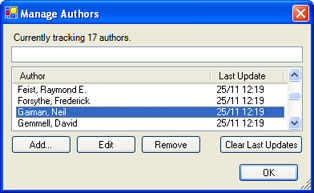
I started with a desktop client that collects release data, displays upcoming releases, and lets me manage the authors I want to track.

It's based on a larger project (The Nexus) that I've been neglecting for months. Not coincidently, I'm at home with my laptop a lot less often than I'd like, which is why accessibility is so important.

I'm no web guru; realtime Windows application development is my thing, so I wasn't inclined to create a web app for the job. But with Google quietly developing a WebOS platform I can build a nice AJAXy site with calendars, RSS feeds, author searches, and a customized store front with Google (and a little help from Amazon) doing the heavy lifting.

The result is that my desktop client is now a light-weight server, effectively transferring my data dynamically to various Google services. In executive speak that's 'leveraging SOA' or as I like to think of it 'using other people's brains and bandwidth'. See below for how it was done.

Developing on the GoogleOS

If a Google powered WebOS becomes a reality, Google's APIs are going to be a cornerstone of their empire. They're coming along rapidly, and companies like Amazon are also producing some fine web APIs. Full details on Google's APIs and developer tools can be found on their Google code site.

The good news is decent programmers of many stripes can develop on the Google platform. The most powerful API - and their standard - is gData. gData includes Java, C++, Python, and C# client libraries; I'm a C# programmer so that's what I used.

I constructed Nexus.Alerts with these Google services:

Also at play are the following Amazon services*.

*I'm not going to focus on Amazon's offerings in this post as I'm saving them for a later one, but let me say upfront that their services are outstanding. Note to Google -- buy Amazon. No, seriously. Buy them.

Calendar

The Google Calendar API rocks. Calendar was one of the first Google services to fully leverage gData, and Google have been active in making sure it's up to snuff. There's plenty of feedback in the developer community and you can add or track issues on the gData open source project issues page.

Here's what I'm doing with Calendar:

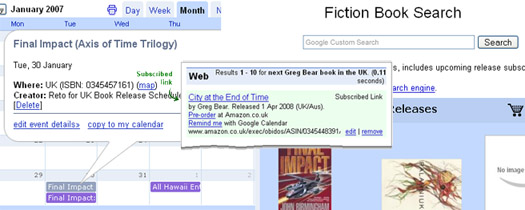
  1. Whenever my desktop client/server finds a new book, it adds a new calendar entry.
  2. If any release details have changed it updates the calendar entry.
  3. If I choose to ignore a particular book, or the book has come out (therefore it's no longer the next release), it removes the calendar entry.

The result is upcoming book releases in the context of my Google calendar.

Here's a few tricky points to note for gCal development:

  • There's no explicit way to 'remember' or identify a particular calendar entry. So every session the desktop app wants to update the calendar, it goes through the book list and reconciles it with the calendar entries. For this to work you need to embed an index, or identifier, into the calendar entries so you can uniquely identify them. I'm dealing with books so the ISBN is perfect. I've put it in the location field because the location field isn't relevant and so is unlikely to be messed with.
  • Getting the correct url path for a calendar to use in the API is non-trivial. None of the 'address' buttons generate exactly the right string. To get the correct path you want a string in the form of: http://www.google.com/calendar/feeds/cagd3an5b8go7bkfbqfvvimhls@group.calendar.google.com/private/full You can get most of those details by clicking the XML button calendar address button on the calendar settings page. Make sure you have /private/full at the end.
  • Asking for all events on a calendar defaults to one 'page' (25 by default). Either remember this and page through, or set your ItemsPerPage for your gDataFeed to int.MaxValue. I've had problems with paging (it didn't), so I'd recommend the latter.
  • No analytics. Google doesn't provide any feedback telling you how many people are using your calendar. Hopefully Google will implement something like the feedback for Google base items that tells you how many people have viewed / clicked through to your item.

...And some bonus tips to take home from the experience:

  • Once you're setup it's really easy. You can keep references to your entry objects, and you can call .Update() or .Delete() directly on the EventEntry objects. So once you've gone through and found the references once, further run-time changes to calendar events are quick and easy.
  • You can include HTML links in the calendar description field! I've included links to Amazon to pre-order books, in future I'll probably add a link to the author's website as well.
  • It's fast. Adding / removing / modifying entries is lightning quick, and the effects are seen instantly on the Calendar WebApp (You may need to hit refresh).
  • As mentioned above, the client libraries are open source and available from Google's Source Code Repository. Get updates as they're implemented and become part of the community.

Subscribed Links (Coop)

I'm a massive fan of Coop, I believe it's Google's most underutilized and underrated service. I mean seriously, a customizable onebox!? Why won't people put useful information in there? It's simple to setup, trivial to update, and can be very effective.

Follow this link to see a Nexus.Alerts book release one-box result.

I'm using SLs to:

  1. Answer question like: "What's the next book by Raymond E. Feist in the UK?" (For any author in the UK/US).
  2. Find out the name of the next release, as well as the scheduled release date.
  3. Provide a link for more information plus a way to pre-order the book from Amazon.

This is probably the tool I use the most often. Perfect when I'm sitting at my desk at work (no gCal!) wondering when the next Feist book come out. 0.11 seconds later I've got an answer. Why don't more people offer this sort of service? "When's The Killers next concert?", "When's the next episode of Lost scheduled to air?". Hmmm, projects for another day :)

To make your own, start with the Subscribed Links documentation, then here's some more tips:

  • Make sure your query covers the likely ways people will ask the question, but be careful not to make them too broad. A match on anything ending with next Feist book in the UK is good, but a query that must match exactly what is the name and release date for the next Feist book in the United Kingdom is much too specific. Conversely a match on anything containing Feist is far too broad.
  • Coop data objects let you specify 'synonyms' for different query terms. My UK book results apply in Australia as well as the UK, so rather than enforce a match just on 'UK', I've included the synonyms: the UK, United Kingdom, Britain, England, Australia, the United Kingdom. It makes it easier for your users to trigger a 'special' search result without having to remember the exact query structure.
  • You can use multiple files to provide data for one (or more) subscribed links. I have three files: The 'rules' (which defines the queries to match and that I uploaded to Google), and two separate 'dataobjects' files (one each for UK and US releases), which I host myself and update twice a day.
  • Host any XML files you're planning to update somewhere you can use FTP to do so. This makes it easier to update them programmatically. That's what I'm doing, whenever book details change I rewrite and upload the dataobjects file(s). Google caches your hosted XML file so your server won't get hammered, the only drawback is the update rate. You'll have to wait for the coop spider to find your changes so it's not real-time. In my experience the spider can be unpredictable, updating changes at least once a day, sometimes every couple of hours.
  • If you're automating this output be aware of XML limitations - make sure to escape special characters ('&' for example) where necessary.
  • Coop dataobjects need to have unique identifiers. This goes across ALL the XML files you submit, whether they're related to each other or not. They're only used within coop internally, but to make them unique and recognizable in the XML as well I'm concatenating each author's name with a GUID.
  • Include as much useful info in your result box as possible. What might you want to do when you get an answer? For me, it was looking up Amazon info on the book, pre-ordering it, or adding a reminder to my calendar; so these options are all available from the onebox.
  • You're creating XML anyway so think about formatting an RSS file at the same time. I produce a feed with items for each new book, with updates if any details change. Remember that RSS feeds are often pushed out based on creation/modification times so it will probably make sense to keep track of when items were last updated so updates don't flood people with duplicate entries every day.
  • Like calendars there's no subscribed links analytics. Coop will tell you how many people are subscribed, but what I'd really love to know is how many people are actually seeing my onebox results -- and how many are clicking the links?
  • The structure of the onebox is tightly controlled. You get at most one link per line so make them all count. Conversely, don't use lines just because you can. If you can deliver all your data in two lines leave it at that.

Custom Search Engines

While trolling for release information I tagged the good sites with the CSE marker to create the fiction custom search engine. It's a side effect of my research, but the extra couple of seconds per search created a useful search engine. Searches using this CSE will prioritize those tagged sites, providing them with a PageRank boost within these search results.

It's worth noting that the degree of this 'boost' is customizable. You'll need to download the XML file that defines your CSE and modify the boost 'weight' for the sites deserving a greater or lesser amount of boost juice. This is really worth doing or tagging Amazon will blow every other tag out of the water. Weighting your tags will let you give Amazon a small (0.15) boost, but an obscure author's homepage can be weighted right up (with a 1.0). Dead sites and spam can have negative boost (retro?) applied (down to -1). I'll leave it at that as there's a great post on Google Blogoscoped that describes this tweaking process in detail.

Now this I really like. Google recently announced support for enforcing the use of specified Subscription Links in our CSE results. So *anyone* doing a search for 'next Greg Bear book in the UK' via the Fiction CSE will get my SL one-box like this. I love this, now we can leverage the CSE and SL onebox results without users having to commit to always letting our results influence their searches. Plus we can create links from our sites that will bring up the onebox results.

The web-based CSE setup doesn't support this yet so you'll again need to download and modify your CSE's XML file. Full instructions can be found in the CSE documentation.

Google Web Toolkit

Like the CSE, the whole Nexus.Alerts website is a side effect. I needed somewhere online to collect all the tools together and thought I'd give GWT a try while throwing something basic together.

Wow. From n00b to Web 2.0 goodness in a matter of hours. In the spirit of full disclosure I'll say that I do have a few years of basic Java programming behind me from my University days, but that fell well short of anything resembling AJAX. The Nexus.Alert website took (start to finish) about 4hrs. That might sound like a lot to any web developer worth their salt, but it would have taken me that long to create it in Google Page Creator.

I'm only 4hrs in to GWT, but here's some notes I've compiled on the way:

  • It's encapsulating AJAX into a widget framework, so knowing Java syntax is
    going to help you here. Really -- it'll help a lot. As will any sort of programming background.
  • The documentation is doco-lite. The samples are great, but there's not a lot more there. There does seem to be a pretty large community using the tools though.
  • Download and use Eclipse for your development work. Eclipse is an IDE for Java, and features things like code completion and syntax highlighting. GWT offers full Eclipse support so there's no reason not to use it (unless you're too h4rdc0rz). I really recommend this.
  • Google's GWT site gives good instructions for creating new projects from scratch for Eclipse but skips how to create an Eclipse project based on a sample. Easiest way is to create a new project, then move everything in the samples 'src' folder into your new project.
  • The Kitchen Sink sample has a GMail style interface with buttons on the side acting like tab pages. But none of the other samples specifically address how to do this! Use the Kitchen Sink sample, the classes you'll want to check out are SinkItem and SinkList.
  • Note that if you want the Google looking colors and styles you'll need to use their sample CSS files. The KitchenSink.css takes care of everything I've needed so far.
  • Start with one widget, then build on top of that. GWT builds up really well and it's easy to follow what's happening if you master one new widget at a time. I started with the GMail style Sinks / Sinklist, then added the HistoryListener (back button support), and finally added country tabs for the calendar and bookstore pages. Popup boxes are next!

Some Final Thoughts on the GoogleOS

The success of any OS relies heavily on the ability of users to write code for it.

You think Windows is so popular because it's the *best*? Good lord. Marketing and monopolies aside, a big reason people choose Windows is because the software they want to use is available on that platform. That software's there due to the relative ease of writing code that works the same on (more or less) any Windows box.

As Google positions itself as a WebOS, their APIs are going to be coming under very close scrutiny by very picky people. Their ability to provide robust, predictable, easy to use APIs (and quickly respond to developer feedback) will go a long way in determining their success against more traditional desktop rivals.

Tuesday, August 29, 2006

GoogleOffice Part 2 : Client Interaction with a Powered Support and News Site

[ Google Office Tools Homepage Google Powered Office Articles GoogleOffice Notebook ]

Last time, I looked at using a particular Google product (GMail) in a business environment. This week I'm looking to achieve a particular business function using a bunch of Google tools together.

Here's what we'll use:

Used together they're going to be the foundation for a customer support site for people interested in industry information (Oil & Gas Technology) as well as my company's PR line. And the best thing? Once set up it's going to update itself regularly with minimal maintenance required from me. Sweet.

This, is what we're heading towards.

But -- Why?

The idea is to create an Intervention Engineering branded website with useful dynamic content that also serves as a central support site for clients; one that requires minimal upkeep but stays fresh. Then if there's something I want to advertise announce I've got an interested forum with a ready made audience.

I'm using these Google services because they let me setup and maintain this support and news site without my having to dedicate a lot of time to it. As you'll see below, I'm going to use these tools to leverage my existing activities to provide content for the site.

Why not make this the main site? If you're online (Amazon, Google, etc.) your main site is you. It should be functional and intuitive. If you're offline (like me) your site is where people go to find out who you are -- because they've just heard of us or gotten our business card and want to know WTF we are. So it's formal, professional, and carefully crafted to deliver a strong message of who we are. The blog is conversational, less formal and more generally informative.

Can You Blog a Business with Blogger?

Indeed you can. A nice feature of Blogger is that it allows you to host your own blog while still using their platform. While I'm developing the blog I'll sandbox it at Blogspot, but when it's ready for release I'll host it on a subdomain like blog.intervention.com.au.

The 5 keys to corporate blogging with Blogger:

  • Customize your template. Branding is key, make sure your colours and logos are consistent with your existing website(s). It's a blog so it can (and should) be less formal, but maintain a consistent look and feel.

  • Blog Widely, Blog Often. This may be a bit controversial, but I'm going to make this site more about the industry than my company. I think this is vital to keep the blog ticking over regularly and a small company will struggle to come up with material. Mind you, I'll blog the s**t out of anything noteworthy that our company does, but I'll also have regular industry posts. My hope is that local industry will start visiting regularly, and the blog will become a part of their browsing routine.

  • Be fair and objective. This follows on from the last point. The blog is less formal than our main page, so we don't have to stick as closely to the script. If there's a problem with a product or project, here's the place to admit it and discuss it with users. If a partner company has a cool new toy, talk about it. Big new project coming up in the region? Talk about it. You get the idea, yes?

  • Encourage interaction. Respond to queries and try and generate discussion and conversation in the comments. Ask questions of your readers to initiate conversations. Trying to decide on which feature to implement? Ask people! Make people know you're there and listening, and give credit where it's due. Why should you bother? It'll make you site dynamic, with useful commentary for zero effort. An active community of readers and regular commentators is the life blood of a popular site, it's difficult to achieve but worth the effort.

Dynamic Content with Related Links, Google Reader, and the GoogleMaps API

This stuff is cool because it adds content without having to put in any effort.

Related Content Links

Google's related content links lets you add dynamic content in the form of news, web links, videos, and searches based entirely on the content of your page.


I've added this related link applet to the bottom of each post to provide readers with additional information on the topic of the article. It's an excellent way of adding depth -- without having to do the hard work yourself.

Create an Aggregated RSS Feed with Google Reader

Use Google Reader to leverage your browsing habits to provide content for your support site.

Each morning I trawl through a couple dozen RSS feeds to get my news fix. That includes a half dozen oil & gas industry and tech feeds. If there's something of particular note, I'll write it up as a post on the blog -- but there's always at least 2 or 3 items that are noteworthy but not worth writing up on my own site.

Reader lets you label each article and has the option of 'sharing' an aggregated feed based on a label. I label 'shareworthy' articles 'intervention-engineering', and then share this feed. When you select 'share' from the Reader interface, you get the option of creating a JavaScript applet that you can embed in your site. This provides a handy 'quick news' panel that updates with current news every day as a side effect to your own news reading! Lazy, but effective.

Show Where You're Working with Google Maps API

Google Maps on websites are cool. They're an excellent way to share information, and they're interactive to boot. The Google maps API makes it easy to add a map to your site, for an excellent tutorial on putting a map on your blog check out the aptly titled 'How to Insert a Map Into Your Blog'.


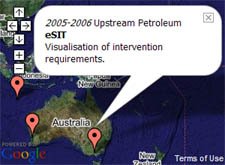
What you put on your map depends on your business. IE's projects are based in remote location all over the world, so I'm going to mark the locations of our projects and provide a little information about each of them. It's an effective way to provide a list of our successful projects and our global coverage. For real-estate or travel sites the use here is obvious, if your business is entirely local, you could put up a map of your exact location.

I've put my map on my support site, but it could just as happily live on the main site, YMMV.

Realtime Client Support with GoogleTalk

GoogleTalk is a great tool for interacting with your clients. The ability to support your customers using IM or voice is the way of the future. Maximise the potention by using Google Apps for Your Domain, create a new alias specifically for client support enquiries. I'm setting up Support@Intervention.com.au. Because we're using GMail, we can use GoogleTalk for IM, VOIP, and Voicemail -- as well as a centralised support email address.


Using hosted GMail nicknames you can shift the responsibility for online support to suit you, without needing to log on to different accounts or change contact details. Your clients email / IM / talk to support@intervention.com.au -- but support is a nickname for me or Stuart depending on who's rostered.

Share Knowledge with Google Coop

I' ve already written an article on Gaining Trust with Google Coop, it gives a decent idea on how I think Coop should be used. I won't go on for long now, but essentially, you can leverage your existing knowledge by making it available to subscribers to your Coop profile. Once people are subscribed, your rankings and subscribed links will affect their search results. If done well Coop can form an excellent part of your communications strategy.

I'll talk more about coop in a later week when I discuss how to increasing your public profile and becoming an influencial voice in the online community.

Next Week

Project Management

This one is going to take a bit of effort on my part, I'm going to use Google Apps for Your Domain, Spreadsheets, Writely, Blogger, Calendar, Google Desktop Search, and the Calendar API to manage a project.

It's going to include timesheeting, invoicing, scheduling, and internal discussion tracking. I'm going to need to write a couple of applications that make use of Google's APIs to help smooth this process along, so I'm going to be busy, but I should have a couple of cool tools to share when I'm done, so keep tuned!