
Kurt Vonnegut, author and playwright, passed away in Manhattan on Tuesday aged 84.
Vonnegut is one of my favorite authors, penning such incredible novels as 'Mother Night' (adapted into a hugely underrated film) and the incomparable 'Slaughterhouse 5'.
Thursday, April 12, 2007

Thursday, April 05, 2007
Google My Maps World Cup Venue Mashup
If you're watching the World Cup and you haven't yet used any of my resources to see where the action is being played out, I've decided to add one more way of seeing the venues.
Using Google Map's new 'My Maps' feature, I've published a Google 'My Maps' hosted mashup of World Cup 2007 venues.
Using Google Map's new 'My Maps' feature, I've published a Google 'My Maps' hosted mashup of World Cup 2007 venues.
For mashup developers, the process of porting the data from an existing mashup into a 'My Maps' mashup took about an hour. The main thing I missed was the ability to change the alignment of text within the description balloon -- otherwise the process was quick and straightforward.
Google Maps My Maps - Dynamic Google Mashups
Ever wanted to create a Google Maps mashup but lacked the Javascript skills?

Google have just released 'My Maps', a service that lets you create your own Google mashups on the fly within the Google Maps interface. The interface lets you add markers, lines, and draw polygons. Each marker can have a full HTML description including full text, images, and videos.
Once you've finished creating your mashup you can publish it for others to search and find, or share it privately with friends, family, or workmates. There's even an option to export to KML for use in Google Earth.
The interface provides the same 'get directions to / from here' options you get with Google Maps, so the resulting mashups are even more useful than before.
Here's an example I've started for Test Cricket Venues that will eventually replace my existing cricket stadium mashup.

This service is amazing.
Google have just released 'My Maps', a service that lets you create your own Google mashups on the fly within the Google Maps interface. The interface lets you add markers, lines, and draw polygons. Each marker can have a full HTML description including full text, images, and videos.
Once you've finished creating your mashup you can publish it for others to search and find, or share it privately with friends, family, or workmates. There's even an option to export to KML for use in Google Earth.
The interface provides the same 'get directions to / from here' options you get with Google Maps, so the resulting mashups are even more useful than before.
Here's an example I've started for Test Cricket Venues that will eventually replace my existing cricket stadium mashup.
This service is amazing.
- Use it at home with Picasaweb to share your holiday pictures with your family and friends. Draw lines across the world to demonstrate where you've been and where you're going.
- Office based Google users can map their clients and projects.
- Plan your next holiday. Put markers in possible destination along with details and links for each hotel / country / beach you plan on visiting.
- Integrate with Google Calendar to show exactly where events are taking place, with annotations describing venue features, possible parking locations and detailed directions.
My call: Best Google innovation of 2007 so far.
What's missing?
- Sub folders for markers / lines / polygons to add some structure.
- Ability to 'hide' lines / polygons so they're on the map but don't appear in the left hand list.
- Custom marker images. Need to be able to add markers using uploaded / linked images.
- Being able to measure distances.
Tuesday, April 03, 2007
Adsense for TV
Today Google announced its long anticipated move into television with an Adsense / Adwords trial. Google are partnering with Echostar and Astound Cable in the US.
It will be interesting to see how their TV ads business works following the relative failure of their attempts to move in to radio via their dMarc acquisition last year.
It will be interesting to see how their TV ads business works following the relative failure of their attempts to move in to radio via their dMarc acquisition last year.
Tuesday, March 20, 2007
When Offshoring Your Development Team Means Buying a Boat
Play word association with most developers and the response to 'offshore' will most likely be a city in India. Starting my career in the oil and gas game meant offshore development has an entirely different connotation. Let me share my first experience as an offshore developer.
Offshore -- meaning 'out at sea'
By the time you realise their office isn't exactly in Portland, you're sitting in a 10' sea container floating in the middle of the Indian Ocean pressing a button every 108 minutes.

What three things would you bring to a desert island?
You're going 150km (95mi) offshore for 3-6 weeks where there's no broadcast TV, no radio, no phones, and absolutely no internet. There is a satellite phone, so if you're ready to pony up $1 / second you can reach out and touch somebody.
If the boat's orientation is right (and the stars are aligned) there might be a nightly email uplink when you can send / receive today's emails on a public, unsecured PC running Outlook Express. Nothing larger than 50kb and absolutely no attachments.
What to bring? The following are verboten : alcohol, women, drugs, explosives. The challenge? Your total allowance is 10Kg (22lbs) which includes a hardhat and steel-capped boots.
Then the essentials:
Three hours on the plane, then straight for the heliport. You catch a chopper out -- with any luck this won't be opportunity to put your HUET to the test -- and so far things are pretty sweet - even if the music piped in through your headset is less 'Flight of the Valkyries' and more 'Best of Tracy Chapman'.
No - that's not a fire exit. Questions? No, there is no fire exit.
You're in a part of the world where there are two seasons, hot / wet and hot / dry. Today it is definitely hot, and the humidity must be 150%. Perfect beach weather, but you're changing in to full length coveralls, boots, and a hardhat ready for your vessel safety induction.
Years of StarTrek means when you're told to 'report to the bridge' you have a brief Wesley Crusher moment. You're shown your muster station and which alarm means to head there -- and which one means you're better off going straight over the side.

You also get assigned a room about the size of a smallish walk-in wardrobe that you'll share with 7 others, each group of 4 on opposing shifts. You learn that yourcommunal death trap room adjoins the engine room and there's only one entrance / exit -- up the stairs. If the stairs are burning you have no chance to survive make your time.
 You glance sidelong at the DVD case when you hear the bridge crew talking about the scourge of piracy, but relax when you realise they're talking about actual pirates... until you realise they're talking about actual pirates.
Your induction moves on to the mess (where posters like this do little to quell concerns), the galley, the smoking room, and the rec room. More often than not, these are all the same room. The rec room has the TV and DVD player and houses the ship's library - filled with all the classics: Playboy, FHM, Barely Legal, People. The DVD selection is more mundane but all have foreign covers and a distinct homemade feel.
Next, before anyone can even think about heading to bed comes the 24 hour living nightmare known as 'mobilisation'.
Just like a LAN party, but with more water and fewer pizzas
 You're building Windows boxes, installing software, and fixing bugs. Then you're stringing CATV and 440V mains leads around the back deck. Telemetry from the ROV has to be fed to survey on the bridge, then back down to you in your inspection shack, so you've got the RS232 breakout box in full effect. Four live video feeds need to be recorded onto four digital video recorder PCs, a frame grabber on the online inspection PC, the bridge, and also backup VCRs.
There's cables everywhere. Access to everything is awkward, and there're always three people trying to occupy the same piece of space, and work with the same piece of hardware. All this is happening on the back deck of a support vessel as it ploughs out to the field at full steam in 2m seas and 24knot winds, with green water coming over the back deck.
They paid for a qualified inspection engineer. Son I am disappoint.
Hourly cost of support vessel and crew: $20,000. Hourly cost of ROV crew and vehicle hire: $10,000. Look on your party chief's face when you tell him the software's crashed and will take 30mins to bring everything back up so everyone can get back to work: Priceless.
You're a programmer, you know this and so does your employer. But the client paid for an Inspection Engineer and expects to get what he paid for.This would be less of a problem if your employer didn't insist on you doing both jobs, or if inspection shifts were less the 12 hours long, or didn't require your full attention.
Now, rather than being the cutting-edge developer on the front lines you're a barely adequate inspection engineer who seems more interested in the software he's using than the job at hand.
Don't try this at home
The job runs 24/7, no weekends, no downtime. You can simulate the daily offshore experience at home:

At 7am the sun's up and you've done the handover to your replacement. After downing a cholesterol loaded deep-fried heart attack, you should be heading to bed. Instead you're front line support for the day-shift, fixing bugs, and implementing features. Around midday you have one last 3 course meal before wedging yourself in to bed so you don't plummet from the top bunk when the boat rolls 30degrees.
You get up at 5pm and head to the mess for breakfast; a quick look at the menu and you opt for the low GI staying power of pork spare ribs and mashed potatoes with gravy. Breakfast of champions. The ROV crew is on midday to midnight shifts, so there's another full dinner put on at 11:30am and another at 12:30pm. Play your cards right and you can get 5hrs sleep a night and still squeeze in 4 full 3-course dinner meals every. Single. Day.
Do I know you from somewhere...?
Three weeks in you realise that this three week job is not likely to finish in the next 24 hours. You email your loved ones explaining that rather than being home by the weekend, you'll be out here for another month.
Time passes.
At 5 weeks the homesickness has replaced seasickness. You're swearing like a sailor and you've not shaved since day three. It's been a month since you've seen your girlfriend (or any other three dimensional woman). There's so much porn being watched that people remark on being genuinely surprised they've never met any of the actors in real life. You've fixed everyone's notebook at least once, have challenged and defeated the entire crew in a series of all-in Quake3 Arena death matches. It's time to go home.
Homecoming
Last night everyone worked 24 hours to get the demobilisation finished, those on night shift (like you) are heading for 36 hours straight. Everyone is barely recognisable having washed, shaved, and put on their 'good' clothes for the first time in over a month. The flight back to Perth is a blur of G&Ts. For the first few days home you're walking with a swagger and when attending to nature you still lean forward and support yourself against the wall (to counter the non-existent swell).
You sit back and reflect. Your bank account certainly enjoyed your trip, and you will never in your life know your code as well as you do now. Was it worth it? No. Will you be going again..? I was back offshore within a month and did almost a dozen stints over 4 years. I've worked with people who went on one job, got choppered off after 3 weeks and quit the second they hit dry land. Your mileage may vary.
[Based on a much earlier submission to Everything2]
Offshore -- meaning 'out at sea'
Lesson 1: The sole developer of untested, mission-critical software, should expect to be going wherever the aforementioned software goes.Sure you chose the oil and gas industry, but you joined as 'the lynch pin of a new technical department'. Sick of relying on external resources for their software, you were hired to write some for them.
By the time you realise their office isn't exactly in Portland, you're sitting in a 10' sea container floating in the middle of the Indian Ocean pressing a button every 108 minutes.
What three things would you bring to a desert island?
You're going 150km (95mi) offshore for 3-6 weeks where there's no broadcast TV, no radio, no phones, and absolutely no internet. There is a satellite phone, so if you're ready to pony up $1 / second you can reach out and touch somebody.
If the boat's orientation is right (and the stars are aligned) there might be a nightly email uplink when you can send / receive today's emails on a public, unsecured PC running Outlook Express. Nothing larger than 50kb and absolutely no attachments.
What to bring? The following are verboten : alcohol, women, drugs, explosives. The challenge? Your total allowance is 10Kg (22lbs) which includes a hardhat and steel-capped boots.
Note: If it's a decent sized job they'll do your laundry nightly, so a few clothes go a long way; just remember they wash them at around 150C, so don't bring any delicates. Or nylon. Or dark colours.3 pair coveralls (pre-washed and worn to avoid that n00b look), hard hat, steel tipped safety boots, sandals, underwear, socks, t-shirts, and toiletries (the latter will last longer than you expect. Don't think about why).
Then the essentials:
- Notebook computer, iPod, PSP.
- Three weeks supply of candy.
- Large collection of TV episodes and movies.
Three hours on the plane, then straight for the heliport. You catch a chopper out -- with any luck this won't be opportunity to put your HUET to the test -- and so far things are pretty sweet - even if the music piped in through your headset is less 'Flight of the Valkyries' and more 'Best of Tracy Chapman'.
No - that's not a fire exit. Questions? No, there is no fire exit.
You're in a part of the world where there are two seasons, hot / wet and hot / dry. Today it is definitely hot, and the humidity must be 150%. Perfect beach weather, but you're changing in to full length coveralls, boots, and a hardhat ready for your vessel safety induction.
Years of StarTrek means when you're told to 'report to the bridge' you have a brief Wesley Crusher moment. You're shown your muster station and which alarm means to head there -- and which one means you're better off going straight over the side.
You also get assigned a room about the size of a smallish walk-in wardrobe that you'll share with 7 others, each group of 4 on opposing shifts. You learn that your
You glance sidelong at the DVD case when you hear the bridge crew talking about the scourge of piracy, but relax when you realise they're talking about actual pirates... until you realise they're talking about actual pirates.Your induction moves on to the mess (where posters like this do little to quell concerns), the galley, the smoking room, and the rec room. More often than not, these are all the same room. The rec room has the TV and DVD player and houses the ship's library - filled with all the classics: Playboy, FHM, Barely Legal, People. The DVD selection is more mundane but all have foreign covers and a distinct homemade feel.
Next, before anyone can even think about heading to bed comes the 24 hour living nightmare known as 'mobilisation'.
Just like a LAN party, but with more water and fewer pizzas
You're building Windows boxes, installing software, and fixing bugs. Then you're stringing CATV and 440V mains leads around the back deck. Telemetry from the ROV has to be fed to survey on the bridge, then back down to you in your inspection shack, so you've got the RS232 breakout box in full effect. Four live video feeds need to be recorded onto four digital video recorder PCs, a frame grabber on the online inspection PC, the bridge, and also backup VCRs. There's cables everywhere. Access to everything is awkward, and there're always three people trying to occupy the same piece of space, and work with the same piece of hardware. All this is happening on the back deck of a support vessel as it ploughs out to the field at full steam in 2m seas and 24knot winds, with green water coming over the back deck.
They paid for a qualified inspection engineer. Son I am disappoint.
Hourly cost of support vessel and crew: $20,000. Hourly cost of ROV crew and vehicle hire: $10,000. Look on your party chief's face when you tell him the software's crashed and will take 30mins to bring everything back up so everyone can get back to work: Priceless.
Lesson 2: Mission critical means if the software goes down, the job stops. When the job stops the company responsible starts footing the bill. Feel the burn.
You're a programmer, you know this and so does your employer. But the client paid for an Inspection Engineer and expects to get what he paid for.This would be less of a problem if your employer didn't insist on you doing both jobs, or if inspection shifts were less the 12 hours long, or didn't require your full attention.
Now, rather than being the cutting-edge developer on the front lines you're a barely adequate inspection engineer who seems more interested in the software he's using than the job at hand.
Don't try this at home
The job runs 24/7, no weekends, no downtime. You can simulate the daily offshore experience at home:
- Put an uncomfortable plastic chair in your bedroom closet where you've hung 6 LCDs.
- Have 3 video cameras recording the bottom of an aquarium, each at a slightly different angle but looking at the same empty sand.
- Park a big-rig next to the adjoining wall (and leave it idling).
- Turn on a humidifier at least 110% relative humidity. Every 30mins alternate between a heater at 45C with an aircon at 15C.
- Invite five complete strangers into your closet.
- Get in, sit down and watch the screens. You need to give a running voice-over that describes what you're seeing, as well as logging the action in software. Don't worry if nothing's happening, just say 'The seabed continues to be flat and featureless. No sign of debris.'
- Have someone lock the door and don't let anyone out for at least 12 hours.
- This is important, have your friends rock the wardrobe by about 30 degrees side-to-side continuously. Randomly have them drop it.
- Every 2 to 4 hours have something on the camera change slightly for no longer than 3 seconds. If you miss it, you lose.
At 7am the sun's up and you've done the handover to your replacement. After downing a cholesterol loaded deep-fried heart attack, you should be heading to bed. Instead you're front line support for the day-shift, fixing bugs, and implementing features. Around midday you have one last 3 course meal before wedging yourself in to bed so you don't plummet from the top bunk when the boat rolls 30degrees.
You get up at 5pm and head to the mess for breakfast; a quick look at the menu and you opt for the low GI staying power of pork spare ribs and mashed potatoes with gravy. Breakfast of champions. The ROV crew is on midday to midnight shifts, so there's another full dinner put on at 11:30am and another at 12:30pm. Play your cards right and you can get 5hrs sleep a night and still squeeze in 4 full 3-course dinner meals every. Single. Day.
Do I know you from somewhere...?
Three weeks in you realise that this three week job is not likely to finish in the next 24 hours. You email your loved ones explaining that rather than being home by the weekend, you'll be out here for another month.
Time passes.
At 5 weeks the homesickness has replaced seasickness. You're swearing like a sailor and you've not shaved since day three. It's been a month since you've seen your girlfriend (or any other three dimensional woman). There's so much porn being watched that people remark on being genuinely surprised they've never met any of the actors in real life. You've fixed everyone's notebook at least once, have challenged and defeated the entire crew in a series of all-in Quake3 Arena death matches. It's time to go home.
Homecoming
Last night everyone worked 24 hours to get the demobilisation finished, those on night shift (like you) are heading for 36 hours straight. Everyone is barely recognisable having washed, shaved, and put on their 'good' clothes for the first time in over a month. The flight back to Perth is a blur of G&Ts. For the first few days home you're walking with a swagger and when attending to nature you still lean forward and support yourself against the wall (to counter the non-existent swell).
You sit back and reflect. Your bank account certainly enjoyed your trip, and you will never in your life know your code as well as you do now. Was it worth it? No. Will you be going again..? I was back offshore within a month and did almost a dozen stints over 4 years. I've worked with people who went on one job, got choppered off after 3 weeks and quit the second they hit dry land. Your mileage may vary.
[Based on a much earlier submission to Everything2]
Friday, March 09, 2007
Cricket World Cup 2007
World Cup 2007 is upon us; the squads have landed in the West Indies and a flurry of warm-up matches are already underway. The real action starts Tuesday March 13th, when host nation The West Indies take on Pakistan at Sabina Park.
As part of my preparations, I've scoured satellite footage for the exact location of each World Cup venue. Considering that construction hadn't started on some sites when the satellite imagery was taken, this was no trivial task! The good news is that Google Maps / Earth imagery for the West Indies is pretty freaking good. The better news is I'm sharing my results!
Tour the Venues in Google Earth
Fly to each of the 12 venues hosting matches in this years World Cup in Google Earth using the World Cup 2007 Venues KML file.
This Google Maps mashup features all the official Test cricket venues for each test playing nation, and now also includes the precise location of all 12 World Cup 2007 venues. As well as the exact location of each venue, you'll see live weather forecasts, seating plans, live webcam links, and a picture of the stadium.
Just The Venues
If you want the venues without the fruit, here they are for your viewing pleasure:
Three Ws Oval, Arnos Vale Ground, Trelawny Stadium, Sir Frank Worrell Memorial Ground, Sir Vivian Richards Stadium,Kensington Oval, Queens Park, Providence Stadium, Sabina Park, Warner Park, Beausejour Stadium, Queen's Park Oval.
Other Resources
For everything else CricInfo have created an outstanding dedicated World Cup 2007 microsite that's an unparalleled resource for all things cricket, so be sure to check that out.
For expert commentary from a member of the CricInfo commentary team, check out Will Luke's personal cricketing blog, The Corridor.
And finally, there's a distinct possibility that Google will be providing some tools to cover the action, check out http://www.google.com/cricket on Tuesday!
As part of my preparations, I've scoured satellite footage for the exact location of each World Cup venue. Considering that construction hadn't started on some sites when the satellite imagery was taken, this was no trivial task! The good news is that Google Maps / Earth imagery for the West Indies is pretty freaking good. The better news is I'm sharing my results!
Tour the Venues in Google Earth
Fly to each of the 12 venues hosting matches in this years World Cup in Google Earth using the World Cup 2007 Venues KML file.

Live World Cricket Map
The Live World Cricket Map Google Homepage module is a Maps mashup that's updated constantly to show every cricket match for that day on a world map -- pitch perfect positioning shows you exactly where the games are being played. For the duration of the World Cup the World Cricket Map is centered directly on the West Indies. There's also a bigger version of the same mashup available at The Cricketing Yak for your viewing pleasure.
World Cricket CalendarI'm embedding this widget into my blog for the duration of the World Cup - check out the top right!
Keep track of the action on the World Cricket Google Calendar that now includes updated map references for all the World Cup venues. I'll be updating the Super 16's and finals details once we know who's playing in them.
The Cricketing Yak's World Test Venues MapThis Google Maps mashup features all the official Test cricket venues for each test playing nation, and now also includes the precise location of all 12 World Cup 2007 venues. As well as the exact location of each venue, you'll see live weather forecasts, seating plans, live webcam links, and a picture of the stadium.
Just The Venues
If you want the venues without the fruit, here they are for your viewing pleasure:
Three Ws Oval, Arnos Vale Ground, Trelawny Stadium, Sir Frank Worrell Memorial Ground, Sir Vivian Richards Stadium,Kensington Oval, Queens Park, Providence Stadium, Sabina Park, Warner Park, Beausejour Stadium, Queen's Park Oval.
Other Resources
For everything else CricInfo have created an outstanding dedicated World Cup 2007 microsite that's an unparalleled resource for all things cricket, so be sure to check that out.
For expert commentary from a member of the CricInfo commentary team, check out Will Luke's personal cricketing blog, The Corridor.
And finally, there's a distinct possibility that Google will be providing some tools to cover the action, check out http://www.google.com/cricket on Tuesday!
Wednesday, February 28, 2007
US Traffic Conditions on Google Maps
Another update from the folks at Google Maps. They now show (optional) traffic conditions for over 30 US cities.

As the screen grab above for Chicago illustrates, the severity of current traffic conditions is shown using a green / yellow / red overlay in maps, satellite and hybrid views.
The same features have been available for select US cities on the Google Maps for Mobile application, so it's nice to see them port it to the desktop version for people planning their trips or checking the roads before heading home.
Let's hope we see this roll out to some of the other countries that now have street maps. Personally I vote for England and Australia ;)

As the screen grab above for Chicago illustrates, the severity of current traffic conditions is shown using a green / yellow / red overlay in maps, satellite and hybrid views.
The same features have been available for select US cities on the Google Maps for Mobile application, so it's nice to see them port it to the desktop version for people planning their trips or checking the roads before heading home.
Let's hope we see this roll out to some of the other countries that now have street maps. Personally I vote for England and Australia ;)
Friday, February 23, 2007
Live Cricket Map Homepage Module Updated
I've finally gotten around to updating the World Cricket Map Google Homepage module.
 I'm now including almost every cricket match played in the world above club level, so now you can follow Internationals, Twenty20, women's internationals, and your domestic sides battle each other for glory with the World Cricket Map on your Google homepage. The latest release uses version 2 of the Google Maps API, so there's better imagery, more road maps, and it works properly in IE.
If you've already got the moduleo n your homepage you don't need to do anything, you should already be seeing better results.
It's been a while since I looked at the Google Hompage Module code, turns out there's been some big improvements since then. Of note is analytics support using Google Analytics. If you've written a module add the analytics code and see how popular your gadget is, and where it's popular. I had no idea that over 100 people were keeping an eye on the cricket with my humble module! Now I feel bad for not improving it sooner -- maybe I should look closer at supplying live scores...?
Also of note is the much enhanced Scratchpad that works as a real-time web-based development environment for you modules. It makes development and bug fixing a breeze and I can't recommend it enough.
Thursday, February 22, 2007
Google Apps Now With Docs & Spreadsheets + Paid Premier Edition

Google Applications for Your Domain has had a face lift and now also provides Google's Docs & Spreadsheets.
The other big news is the availability of 'Google Apps Premier' -- a $US50 / year / account service (free until May) with 24/7 phone support, 99.9% GMail up time, single sign-on support, no Adsense, and email gateway support (say hello Blackberry users!). This page shows the advantages to upgrading or you can compare the differences between versions. Educational institutions get Premier for free!
For developers there's new APIs for Google Apps, including provisioning, single sign-no and email gateway interfaces. Applications that make use of these new APIs can only be used with the Premier edition.
This push makes Google Apps a serious threat to Microsoft's Office empire. Keeping in mind that for large Enterprises the thought of hosting their applications off-site is an anathema. Likewise power users of Office applications (Excel in particular) are unlikely to consider switching. Spreadsheets' lack of support for pivot tables, a scripting language, advanced formulas, and form components makes it a non-starter for a lot of organisations that use Excel for data manipulation.
But For smaller companies (or educational institutions), the power-tools available in Excel and the rest of the Office suite are less important than the ability to write a fax, tabulate numbers, and easily and securely collaborate on spreadsheets and documents.
For these users remotely hosted applications that actively support collaboration are very attractive. Particularly with the 24/7 phone & email support Google are offering. Indeed for some operations the cost savings in application support far outweigh the $50 a year Google are charging for their office suite and will count as a net positive.
As an aside, this means that my Google Timesheeting tool is much more closely tied. I've updated my recent blog post on timesheeting with Google and posted some suggestions for how to make the most of the integration at the Office Tools Group.
Monday, February 19, 2007
New Timesheets Tool Release (v0.9.1)
I've just released a new version of the Timesheets Tool.
v0.9.1 is a bug fix release that fixes a bug in the reporting module for users with a Google Spreadsheets Account created with an email address from a domain hosted by Google Applications for Your Domain.
The users affected would have received an 'Error: Timesheet Not Found' dialog when creating timesheets even though the correctly named timesheet existed.
v0.9.1 is a bug fix release that fixes a bug in the reporting module for users with a Google Spreadsheets Account created with an email address from a domain hosted by Google Applications for Your Domain.
The users affected would have received an 'Error: Timesheet Not Found' dialog when creating timesheets even though the correctly named timesheet existed.
Tuesday, February 13, 2007
GoogleOffice Part 4: Timesheets
[ Google Office Tools Homepage Google Powered Office Articles Google Office Tools: Timesheeting ]
Everywhere I've worked timesheets have always been the source of rancour. Whether it's people not completing them on time, using the wrong project codes, using an old template, or having to fill out three separate forms every week - timesheets always seem more complicated than they need to be.
Outlook and Excel are the defacto tools for timesheeting, but putting aside that GoogleOffice is free, Google's Calendar and Spreadsheets are actually better suited to the job. The access controls and collaborative features of Google Calendar and Spreadsheets streamline timesheeting in a Google Office.
Timesheets in Google Spreadsheets
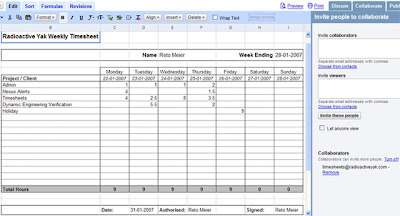
Spreadsheet's collaboration and access controls make it excellent for timesheeting for a small business or an individual. Start by creating a timesheet for every employee, and sharing that (with write access) with your 'payroll' or 'timesheet' account
Everywhere I've worked timesheets have always been the source of rancour. Whether it's people not completing them on time, using the wrong project codes, using an old template, or having to fill out three separate forms every week - timesheets always seem more complicated than they need to be.
Outlook and Excel are the defacto tools for timesheeting, but putting aside that GoogleOffice is free, Google's Calendar and Spreadsheets are actually better suited to the job. The access controls and collaborative features of Google Calendar and Spreadsheets streamline timesheeting in a Google Office.
Timesheets in Google Spreadsheets
Spreadsheet's collaboration and access controls make it excellent for timesheeting for a small business or an individual. Start by creating a timesheet for every employee, and sharing that (with write access) with your 'payroll' or 'timesheet' account
With payroll and staff both having access to timesheets everyone involved can 'sign off' electronically thanks to the built in revision control. Go one step further and share read access with any external agencies that might need timesheets (like agencies or umbrella companies for contractors). This prevents the seemingly endless duplication -- I've had to fill out 4 separate timesheets for a single contract.
Annoyingly spreadsheets isn't part of GAfyD yet, so you'll need payroll to create a Google account for the job. UPDATE: Spreadsheets now is available as part of Google Apps. So just share your timesheet with the same timesheet user you share your calendar with.

Spreadsheets supports exporting to Excel/ODF and PDF so you can print or save backups. I personally save PDFs of all timesheets after I complete payroll to make sure there's always a backup once money's changed hands.
If you'd like to make things even easier, you can automate the 'filling in' part of the timesheet process by using my Google Office Timesheet Tool.
Recording Time with Google Calendar
I recommend using calendar to track your daily activities on the fly. To make my life even easier I've written a Windows tool for timesheet data entry that uses the calendar API to make this really quick and easy.
Start by using Google Applications for Your Domain to provide timesheet calendars for you and your staff. Create a 'Timesheet' account and invite it with read access to all your employee timesheet calendars. Then have your staff record their daily activities on their timesheet calendars, adding a new entry whenever they switch clients / projects.

That timesheet account can now get times for invoicing and timesheets without having to chase up every team member asking how long they spent doing what.
When you enter your activities make it easy on yourself by including the project or client in the title text - even if that's *all* you put in the title. If you get the level of detail right and make it a regular intraday activity this should take most of the pain out of timesheeting.
Some Timesheeting Tips
- Create (and regularly update) a shared company wide 'Admin' calendar that includes staff meetings and public holidays. You and your staff can copy these admin activities straight to personal timesheet calendars.
- Include a 'Make sure Timesheets are complete' task with a reminder in your admin calendar for the day before you usually process payroll.
Monday, February 12, 2007
Easy Timesheets with Google
[ Google Office Tools: Timesheeting Timesheet Quick Start Guide Downloads ]
[ Latest Version: 0.9.1 (18/02/2007) ]

Simple Time Entry
[ Latest Version: 0.9.1 (18/02/2007) ]
I'm releasing a freeware single-entry timesheeting tool that uses Google's Calendar and Spreadsheets services to automate your timesheeting, making it as simple as possible.
Check out Timesheets at Google Powered Office Tools.
Simple Time Entry
Just add a new entry whenever you switch projects, and the tool will add it to your Google timesheet calendar. It tries to be smart by ending the last task when you start a new one, finishing your last task at the end of the day, and keeping track of your previous projects.
Easy Timesheet Creation
Sums the time spent on each project for each employee from their Google Calendars and fills in Google spreadsheet timesheets for each of them. Have your staff share their timesheet calendar with a 'Timesheet' user to create their timesheets for them with a single click!
I've created and shared templates for weekly, monthly, and yearly timesheet formats. Just login to Spreadsheets and choose import, then point them to the right location. Once imported, just rename the new spreadsheet for each employee (Eg. 'Reto Meier Timesheets').
Tuesday, February 06, 2007
GoogleOffice Part 3: Knowledge Bases with Google Groups
[*New*: Google Office Tools Homepage Google Powered Office Articles ]
Every techie knows Google Groups (formerly DejaNews, and in paleolithic times - Usenet) is the magic beans of software development, by itself it's justification for getting Internet access for developers. It is the best, largest repository of esoteric information on the net.
You may have noticed that a couple weeks ago a new version of Groups came out of Beta. When Groups-Beta was released I pretty much ignored it; It was always the content that was important - the group was just a category inherited from Group's origins with and dependence on Usenet. So other than looking more '2.0' what could Groups-Beta offer?
Google Groups is actually useful for business
Well, it's a substantive improvement in terms of functionality, Groups now features full read/write access controls; file, document, and web hosting; as well as the revamped discussion groups. Now you can create private knowledge bases full of development resources and use Google's technology and servers to host and search it.
Groups is not your Grand-Daddy's Usenet. Use it to:
- Host private knowledge bases for you and your company, with resources for development technologies.
- Host a client facing homepage for products, where users/customers are encouraged to participate in the support forums and where product downloads and documentation are readily available.
- Create a resource site for your team's development projects, where team members discuss bugs & features and store project resources, QA builds, project plans, and documentation.
Knowledge workers need fast access to information
We sure as hell don't have email and 6Mb broadband to keep in touch with clients. We have tech forums and programming meetings to share development tips - it's what code reviews and pair programming is all about, your manager called it knowledge sharing. Most IT knowledge workers already use groups to search for information, so they're not learning any new behaviours
When we are keeping in touch with clients it's convenient (for you and them) to have a single point of contact rather than relying on interfaces with individual developers. Use groups to host your product downloads, support forums, and documentation.
Earlier I mentioned three things to store in a knowledge base:
- Company specific (personal) knowledge about a particular technology
- Development knowledge about a particular product
- Customer facing (and customer contributed) knowledge for a particular product
Let's look at each more closely.
Create your own private (or company-wide) knowledge base
Access controls let you create a knowledge base with access limited to yourself or your company. I've created a private Group for each technology I use (currently one for Google code and one for C# development). I've invited each of my staff to become part of the group and encourage them to post clever resources like code-snippets, and to ask (and answer) tech questions within the forums. I also make sure everyone forwards email chains with problems / solutions into the discussion forum.

Because access is limited to the people you invite, you can post sensitive company questions / answers / code snippets / binaries without fear of public disclosure. The centralised archive means all the members have access to the same information as soon as they've been given access -- no more archives and forwarding mailing list emails to new staff. And the information is available on any Internet connected computer.
File hosting gives you somewhere to store cool icons, useful toolkits or 3rd party resources. The 'Pages' (or 'wiki' or 'documentation') section gives you somewhere to put company doco, like coding guidelines, naming conventions, FAQs, etc. The documents are collaborative and revision controlled (think Wiki) so staff can update them as required and everyone can see what's changed and when.
You also get the Groups' discussion forums, with all the usual goodness like staring, sticky posts, closed discussions, ratings, and threading. Staff can choose how they read and contribute to the group using email, digests, RSS feeds, browsing, or searching.
If you're feeling adventurous, check this out. I've also created a secret private 'me access only' group, but rather than posting snippets, I post full source code. All my source code. A full text, universally accessible, fully searchable copy of my code base. I know some of you just threw up a little in your mouths, and yes, it has risks. You can minimise them by obfuscating the code a little (remember it's not a source backup, it's a knowledge backup), remove all the headers at the top of each source file and kill all project / solution / package references -- anything that gives the files structure.If I release a product I need to host it somewhere
At a minimum that site needs a descriptive homepage, support / discussion forums, access to the most recent downloads, and all the release notes, FAQs, and documentation.
Now I could build this myself, and it would be someone's job to update the info, monitor the server, and deal with the support emails. But me and my small staff don't have the skills or the inclination to do it properly, plus I'd rather the whole team participate in support to get a feel for what the users are saying. So rather than building from scratch I suggest creating a new Google group like this one for my Google Office Tools.
Write a 'welcome message' (effectively a homepage) with a description of your product with screenshots & PR material. You've got 100mb of file storage to host your downloads, and a built in support / feedback forum. Use the documentation tab to provide release notes, FAQs, how-to guides, etc.Customise the look and feel by changing the colour scheme and fonts to bring the site in line with your product or your other websites. Using the 'navigation' tab in the settings, hide the 'members' tab and rename 'Files' to 'Downloads' and 'Pages' to 'Documentation'.
You've got a clean, structured, and reliable homepage that you can build a user community around. You even shift the burden of server load or bandwidth to Google in the process.
Manage your projects internally with a project management site
I also want somewhere for my project team to host technical specs, store binaries, and ask project specific questions that customers shouldn't be reading but which are too project specific to store in the technology knowledge base (what's the address for the SQL server we're using for QA? What are the RGB values for the colours used on the splash screen?), so I invite the team members for each project to a private group.

I cross-post bugs and feature requests here, as well as a summary of when / how bugs were fixed (or why they weren't). The files section hosts the current QA and release binaries as well as the last QA source, plus things like project graphics or required release distributables. The documents section holds the project plan, specification, release schedule -- all version controlled Wikis.
If a new team member joins they've got a first place to look for answers to their questions, and an excellent place to ask questions they can't find the answers to.
General Tips for Professionals Using of Google Groups
- Structure your documents. By selecting 'Rearrange your documents' in the 'documents' section, you can structure your documents into a sensible hierarchy. 'Sub-documents' will be indented underneath their parent and will be shown when you view their parent. Hierarchies can go multiple levels. [Here's an example].
- Add your product or company logo. Each group lets you include a logo that will be displayed on the top left and in the listings.
- Discussion posts via email. If you have an email discussion with someone that covers technical details or any other useful information, bcc or forward the conversation to the appropriate knowledge bases. You can get the email address at the bottom of the full discussions list (next to the XML feed icon).
- If your knowledge base is going to feature a lot of code snippets, set the default view to proportional font in the appearance tab of the group settings.
But what's wrong with using Outlook?
The three most common technological solutions I've seen are: Mailing lists and/or Email folders, Wikis, Internal databases.
Email and mailing lists are difficult to search and a pain to distribute to new staff and Exchange is a dirty whore to search (especially server folders). Watch your mail server get pwned during a particularly heated discussion about a message with a 3Mb attachment.
People ignore email messages older than 5 days and will never go back to them while Wikis tend to be too formal, which can intimidate new users, and are seldom up-to-date. Plus you have to setup and host a Wiki somewhere.
Internal databases are generally an admission that using Outlook just isn't enough. Generally these systems have special data entry requirements (and a new UI) that staff need to learn, have specific access permission requirements, and that often can't get accessed away from your desk (or the office).
Monday, February 05, 2007
Google Local Australia Live
Full Australian business listings and driving directions are now available at Google Maps Australia and Google Maps for Mobile.

Google has been steadily adding Australian support to Google maps over the last few months, including satellite imagery, local street maps, geocoding, and as recently as two weeks ago the the Australian domain of Google maps went live.
Google has been steadily adding Australian support to Google maps over the last few months, including satellite imagery, local street maps, geocoding, and as recently as two weeks ago the the Australian domain of Google maps went live.
Google Maps Australia now joins Europe and the US in providing driving directions and local business listings (provided by Truelocal, a local listings provider from News Limited). Apparently this is part of the Google / News Limited deal from last year which saw Google Ads in MySpace.
It's a welcome addition to the Australian local search market that has for years been dominated by Sensis -- the online arm of the formerly government owned telephone monopoly Telstra. Sensis provides both White (personal) and Yellow (business) pages searches, as well as hosting Whereis, the incumbent Australian local mapping service.
Sensis' Whitepages and Yellowpages have always been pretty strong, but Whereis has been stuck somewhere in the Web 1.0 dark ages for a long time, so I expect the growth for Google will begin with maps and develop from there. The current user base for White/Yellow pages searches is still big and loyal enough that it will take some time for Google to start making an impact on local search. But Google's innovations in mobile local search and providing personalised local search should help it win over market share.
Sensis' Whitepages and Yellowpages have always been pretty strong, but Whereis has been stuck somewhere in the Web 1.0 dark ages for a long time, so I expect the growth for Google will begin with maps and develop from there. The current user base for White/Yellow pages searches is still big and loyal enough that it will take some time for Google to start making an impact on local search. But Google's innovations in mobile local search and providing personalised local search should help it win over market share.
Subscribe to:
Posts (Atom)


